Hi just seeking some assistance with a relatively long lived Tumbleweed machine which has started booting into a terminal after quite a few years of sterling service, so it has quite a lot of Flatpaks & runs on Gnome with some add ons enabled.
By way of background from the Grub menu I am able to boot into Debian Stable from a partition on the same SSD, so the disc & hardware seem fine as far as I can tell, although I guess the TW BTRFS partition could have problems perhaps? I have also tried the two different Kernels offered in Grub but end up in the same place as does the recovery options therein.
I tried running jouranalctl I think it was and got pages of historical details about boot ups but couldn’t see anything obvious in there to my non IT support guy eyes. I have also fired up the system from GRUB using an old ish TW USB ISO & gone into the Rescue system which seemed to end up with some errors reported along the with about 7 lines on rsyslogd segfault at 9c etc. which doesn’t mean much to me but maybe some faults I guess?
After that it offered the repair / recue login - tried my own user details but it doesn’t like those & I am unsure what the user name & PW are for the recovery mode, sorry haven’t had the time to search it up yet.
Question is here:
So to cut a long story short - can anyone advise what things to try, commands to run, how to log into the recovery terminal etc. to try & rescue the system rather than me having to reinstall the whole OS from scratch please.
I thought by selecting an older kernel that’s what I was doing? Using the recovery option under advanced rather than the regular kernel I still get the terminal, but doing ctrl D therein does seem to boot me into a graphical desktop.
I have done updates there & turned off extensions & also switched off auto log in as that seemed to throwing up an error in the logs I looked at. However when I reboot after all that it still seems to be the same story of getting dumped into the terminal to sign in again.
The only thing I have noticed is that in both case the recovery & reboot I get black screen & then maybe the bottom of the Gnome date & clock showing at the top of the screen. On the recovery option I did get the log ion screen after a few seconds, in the reboot as I say I get the terminal again.
Not sure if that means anything to anyone? I guess the next thing is to try loigging into the Gnome guest from the recovery log in screen perhaps?
Ability to login on ttys means you have a running system. As a Gnome user, almost certainly your GUI login is produced by GDM, and very likely your problem. So, as a user who never uses GDM or Gnome, I would think a check to start with would be systemctl status gdm, as well as using gdm as search term running journalctl.
If you are a user of NVidia GPU and its proprietary drivers, a search for NVidia here in the forums should provide needed troubleshooting steps and solution. It’s typical for NVidia users to have trouble when the kernel’s major revision increments, as just happened with 7.3.0 introduction following 7.2.11 in TW20261022 a week ago.
What kernel versions do you have currently installed? What TW release did you last upgrade from?
Thanks for taking the time to reply. Yes I have been chatting with AI all morning & looked at various things in relation to the GDM - which seems to be the problem. No Nvidia my system details are:
System Details Report
Report details
Date generated: 2026-10-30 13:58:58
Hardware Information:
Hardware Model: ASUS PRIME A520M-K
Memory: 32.0 GiB
Processor: AMD Ryzen™ 5 5600G with Radeon™ Graphics × 12
Consider setting up “timeshift” snapshots if you do not have btrfs snapshots. timeshift snapshots have bailed me out countless times. timeshift is available from OSS repo.
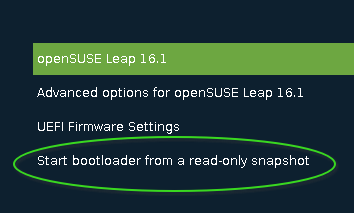
Ah OK maybe I’ll try that with a reboot on my Tumbleweed I see what I get, although it looks like I don’t have that many. I think from memory I only see TW + Advanced which shows previous kernel + recovery, + UEFI settings & I have also started seeing DVD, CD USB option where I have the recent USB live image plugged in too.
I tried repair on that too, but got to a terminal as well & didn’t know what to so from there or if there are any further commands I can issue in there to help. I guess not as from what others have said I seem to have a working system - just not a display manager that works reliably. Guess I could try a different DM like lightDM maybe - although that may not play well with Gnome I guess. Sorry I do waffle on.
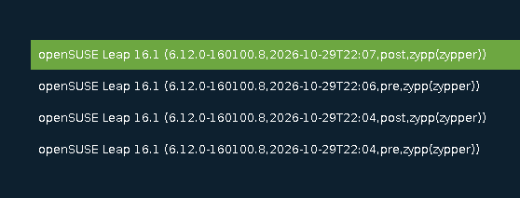
Tried that & found it at the bottom by scrolling down further as it was off the screen. I tried the oldest one from 25/10 albeit with the same kernel & it seemed to work in so far as it logged me straight in.
So does one just roll with this & update it from here? Not really had to use snap shots before, or as it is read only doe that mean I can’t make changes to it?
This means you changed the defaults for snapper and have a very limited number of snapshots. If you then switch a couple of times you cannot go back very far, because rolling back creates a new snapshot. The system was installed on Feb 10 2024. (1),
Yes I rolled back to the 25.10 one & it seems to work. SO i looked up how to do it & did Sudo Snapper rollback. This made that the new default boot which I was able to boot back into. Hopefully updating from here won’t bring the same issue again.
Thanks for you contributions, unfortunately as soon as I did a DUP I have ended up back in the same place at the terminal log in again. Sadly I didn’t heed your advice about checking the updates, although I don’t think there was anything that controversial in there.
It was going from a 25.10 to a 30.10 update I think, just wondering if it could be a change to Gnolme 51 causing it perhaps. On the recovery terminal when I run the recommended journal ctl command I get 3448 lines of text so hard to see what if anything might be wrong in all that & I don’t know how to save / share it.
So it seems I’m stuck in a bit of a roll back loop, or I guess I might have to change the OS out on this particular box - unless anyone can recommend some commands to run in the terminal to try & diagnose?
I think it is probably to do with GDM, but I tried various checks & restarts on that first time around. It did try to work once or twice as I briefly saw half a clock at the top of the screen before it fell back to the terminal.
Sorry to bother you with this, but I thought this might be the best way to resurrect this topic having previously marked it as solved, which I have now unticked.
Since you have Radeon graphics, see if downgrading llvm to llvm-23-1.1 fixes your issue.
You may need to downgrade also libLLVM23 to the version still available in the /history/20261024/tumbleweed/repo/
Thanks for taking the time to reply again. I did the systemctl status display-manager - I think it was running, but there may have been some errors, but same issue with saving etc. . And tried sudo systemctl isolategraphical.target to try & launch - but that didn’t seem to do anything. I think they are the equivalent of GDM, but I’d still need to try that when I get that machine back on.
Finally “simply” redirect the output of Journalctl to a .txt file - unfortunately I’m too simple to know how to do that in the terminal - but now you mention it I’ll have to go away & look it up or ask AI maybe.
@OrsoBrumo I looked at removing llvm-23-1.1 but then it said it wanted to remove some things that depended on it so I wasn’t too sure about that. But as it has the 22 version installled I think maybe it would fall back to those. Strangely on the newer box I’m posting from here which also runs a newer AMD Ryzen chip with integrated graphics & which has been updated around the same time only has the 22 version of llvm & has continued to be fine throughout - so that seems a bit odd to me.
Let’s be accurate, please, if we are going to troubleshoot this.
There is no TW20261025 so we still don’t know what snapshot really worked.
Then you had the problem on October 30, TW20261030 was not released yet and Gnome 51 was not yet on the regular repos.
So while Gnome 51.1 might have its problems (I see none here BTW) it is unlikely that it caused the problem described on this thread.
If the system is actually using llvm22, there were no recent upgrades; looking at zypper se -si llvm might be useful.
Redirecting the journal to a file is as simple as journalctl -b > Documents/journal.txt (change the file destination to your liking of course).
systemctl status display-manager or systemctl status gdm should provide the same output on a properly configured Gnome desktop; otherwise there is something odd.

 - but now you mention it I’ll have to go away & look it up or ask AI maybe.