Thanks for the link. Brave and its creator have a messy history, bu the browser can be made fairly private by spoofing the UA, setting shields high, and then allowing standard-level shields for the sites which need them.
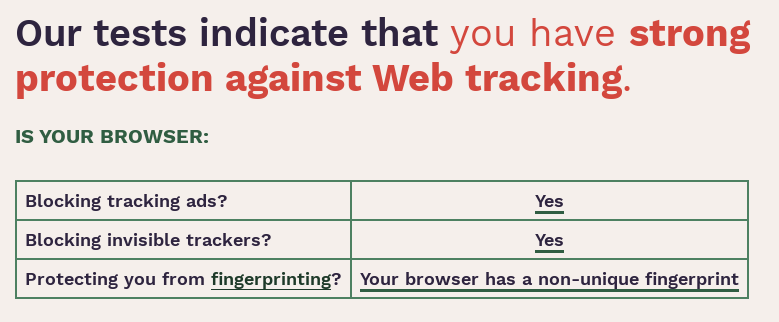
[https://coveryourtracks.eff.org/] shows my instance of Brave with "strong protection against Web tracking*, with good ratings for all 3 issues in the short table. My User Agent string reports generic Google Chrome Linux. EFF shows this string matching 1 in 84 browser page requests, that’s probably the highest you can get from Linux_x86_64 without presenting the wrong video API.
EFF gives me a passing score, but shows issues which a web tracker site could use to identify “my browser” in a nearly unique way:
- My system fonts. A vicious tracker with permission to actually display elements can use javascript to show spans for a lot of different and specific fonts, then detecting ‘system fonts’ which ARE available by using the element’s resulting size. My set of detectable fonts is matched by only 1: 14,860 other browser visits, that’s not good.
- In the test for tracker-inspectable DOM data, my browser was not unique at all. (1:1.14 ratio.) Maybe nothing was sent back, but I should still try to removed some kinds of DOM storage use which Brave allows.
- My “WebGL” and “Canvas” fingerprints leaked nothing, but Javascript still includes a query for “WebGL Vendor & Renderer”, and my system’s response is almost totally unique. The EFF test estimates than only 1:38,000 browsers will provide the response which I did. (I have an Intel ARC dekstop card, hardly anyone uses those.)
Between my font list and my leaking video card details, my computer’s standard web browser" is almost uniquely identified. The reported browser window size is also nearly unique (1:89,000) but I’m always changing that on the fly. Any trackers who do use that, and there might be a lot of them, will create worse information about “me” than they would have by ignoring it.
I’m glad to see and hear that I made a good initial choice! I moved away from Brave due to the Manifest V3 thing from Chromium browsers. I chose LibreWolf because it’s a privacy-focused Firefox fork. It looks like I have no regrets so far!
The “crypto” crap can be disabled pretty easily: First, within ‘shields’ and ‘Web V3’, blacklist the features for all websites. Then destroy (erase) your current wallet.
The use of derivative browsers introduces a reliability and risk factor at the moment you use a sync account for bookmarks, history, …
For example, in Librewolf if you want to use the bookmark synchronization, you must log in to your Mozilla account and those credentials first go through Librewolf before reaching Mozilla. That is, you are “inviting” a third party (Librewolf) into your Mozilla account path.
Firefox can easily be left with a more privacy oriented configuration, similar to Librewolf but without having to use Librewolf.
Just as in Linux I use only major distributions, on the internet I only use major web browsers, not derivatives, so you remove reliability links from the chain.
I switched as well and I’m currently using Floorp 
I’ve seen nothing in Librewolf that suggests they route your account credentials through their own server.
I believe Brave mentioned they will support a selection of MV2 extensions even after the switch. However you’d have to deal with Brave, which is bloated with junk like their crypto coin wallet.
Just a few words: manifest V3
So yeah, Firefox it is for me, nevertheless

In this video, Drew of Just a Guy Linux demonstrates adding a custom settings profile to clean up Firefox.
A Better Firefox!
No amount of customization can save you from a EULA and the maintainers ability to discretely override your choices
This summarizes the entire content of the thread. Since this can happen with any browser, it doesn’t matter which one you use. Everybody should use what fits their needs best.
I pretend I didn’t see anything about it and keep moving forward. Two times I needed to open chrome because firefox wouldn’t work.
-
password reset wouldn’t send me the email from firefox, only would send password reset if I clicked the link in chrome. I forget what website it was but it was for gaming, like ubisoft, activision, rockstar. I can’t remember which one. this was a couple years ago too could be fixed now.
-
betway sports betting wouldn’t let me place a bet from firefox, had to open chrome to place my bets. this was also some years ago.
Hello 
Right now, I use two browsers.
One is LibreWolf, where I’m just a regular citizen. I log in to Amazon, Microsoft, and many other services. I use my real IP from my internet provider.
The other browser is for my alter ego… an avatar with no logins that could be linked to my real identity. No credit cards, no PayPal, nothing personal. I only use a free ProtonMail account there, mostly for signing up for services.
In this second browser (which was Brave until now), I use Surfshark VPN with a different IP address.
I tried using Surfshark in LibreWolf, but it doesn’t work well. It’s unstable for me.
Thanks for sharing the issues with Brave. I’ll check them out and look for another browser.
About Flatpak… there’s one thing I don’t like: when I customize font sizes or types, it doesn’t adjust properly. Everything looks too big or ugly.