Hi
Can you try some alternative resolutions? 640x480 1024x768 I think you might need to hit the hyper-v forums 
They all work, even 800x600, if I omit @60, I can see it resizing the Hyper-V window, but it still drops me at a blinking cursor.
I’ve also now edited /boot/grub2/grub.cfg (ignoring the warning at the top not to edit it) to add nomodeset to the normal boot options, as I can’t access tty without it.
In the attached screenshot, I tried 600x800, but if gave that same error, I think it said “out of range: skip”, and then didn’t resize the window, but I could still get into tty. I tried to run startx, and it gave me some things to google, but I’m posting the screenshot as well, just in case it gives you any ideas.
https://susepaste.org/1657882
Hi
Ok can you remove the nomodeset and use the following and see if it helps;
video=hyperv_fb:1024x768
Still blinking cursor. Took a lot longer than usual until it responded at all to Ctrl + Alt + Fkeys, but when it did, it still wouldn’t let me in to tty, goes back to the blinking cursor after less than a second.
With just using nomodeset, or 3, if I run sudo startx from tty I get a desktop! It does give me warnings about running a privileged session, but it’s progress. The screenshot earlier shows some permission stuff I need to look at I think.
I know nothing at all about permissions in Linux, so this is gonna be fun.
Hi
Yes, you shouldn’t need to do that, I think you need to talk with someone with hyper-v experience, I suspect that something has installed incorrectly as a result of graphics issue
Yes that seems to be the case. I addressed a few of the permissions errors but there seems to be more, so the setting of permissions during install appears to have gone wrong. I know I should reinstall, but I’m treating this as an opportunity to learn more about Linux.
Hyper-V officially supports Ubuntu, so I fully expect to be told to switch to Ubuntu if I ask on any Hyper-V focused forums. I’ll give it a try though.
Hi
Need to understand what the graphics setting need to be…
So your running on a server or desktop? I can boot to windows here and install hyper-v.
https://susepaste.org/57459368
There aren’t any graphics settings in Hyper-V. It works perfectly with windows, which is all microsoft cares about. Change the resolution in a windows VM and it resizes the window, that’s the closest it gets to graphics settings, it’s supposed to just work, because microsoft expects everyone to just use windows. During creation, you get to choose generation 1 or 2, which is their dumbed down way of saying MBR or UEFI, kinda. I installed as gen 2. Tried running it as gen 1, but it didn’t even reach the boot menu, because gen 1 doesn’t support UEFI. When I tried the live CD, I tried running it as both, and got the same results.
I’m running this on my desktop, windows 10 professional.
Hi
Can you try vga=normal on the boot command for the live version (no nomodeset)?
No change. Also tried it on the installed version, also no change.
Hmmm maybe it is systemd
https://www.theregister.com/2021/11/17/ubuntu_team_systemd_windows_wsl2/
4th paragraph of that article, read the part in the brackets.
Hyper-V and WSL2 are not the same thing. I am not using WSL2. I am not even using WSL at all. In fact, I do not have WSL installed on this computer. I am using Hyper-V.
Furthermore, I am not using Ubuntu. No part of my setup involves Ubuntu. I am using openSUSE Tumbleweed in a Hyper-V VM on windows 10. As I stated in my initial post.
Hi
So I have a NET install of Tumbleweed (20211116) running (about 25% done) on Hyper-V, I couldn’t use the USB device I added, so just wrote an image file to the USB device instead.
For the desktop I selected XFCE. Now in Tumbleweed the updates repo is only used for urgent outside of the snapshot releases (hotfixes), so I disabled this repo as well as the non-oss one as nothing from there is needed for install. Bear in mind these repos are present after installing, just not used for install.
Stay tuned 
To use the USB device directly, you have to take it offline first. To use Linux terms, you have to unmount it, as windows mounts all drives it can automatically. Right click the start button, open disk management. Ignore the list at the top, scroll the bottom list down to your USB drive, right click on the box at the far left end, and click offline.
When I did my install, I’m pretty sure I selected Gnome, but I feel I probably should have done XFCE as well. I looked at the online repos, but didn’t change anything, and I’m pretty sure updates and non-OSS are selected by default.
If yours works out, I’ll reinstall with the same settings you’ve used, as clearly my install has had something gone wrong.
Hi
Well it worked…
https://forums.opensuse.org/attachment.php?attachmentid=1019&stc=1
https://forums.opensuse.org/attachment.php?attachmentid=1022&stc=1
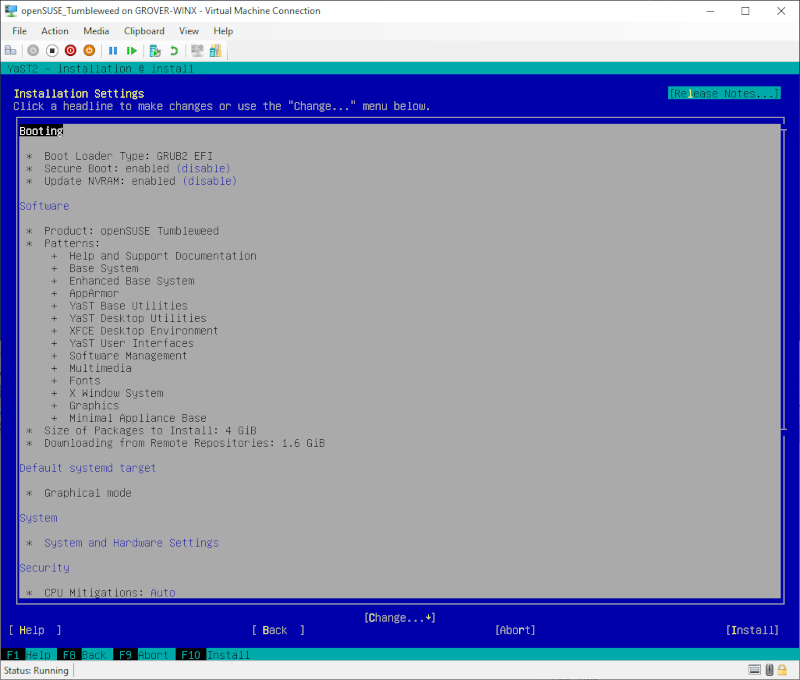

My guess is that it’s the non-OSS repo that’d make the big difference, that’s where fancy graphics drivers are, isn’t it?
I’m starting the reinstall now, it’ll be several hours.
I do note though that yours is a text based installer, but mine only starts text based to connect to the internet and download a fancy installer. Is the text installer more reliable? I would think the fancy graphical one is just a frontend for the text installer.
Hi
Yes, I set textmode=1 (then pressed the esc key to see more info). No, non-oss is for selected packages that are proprietary in nature (licensing) AND can be distributed, graphics drivers amdgpu-pro and nvidia are in separate repositories outside of the openSUSE infrastructure 
Note I did use the latest snapshot as well for the net install…