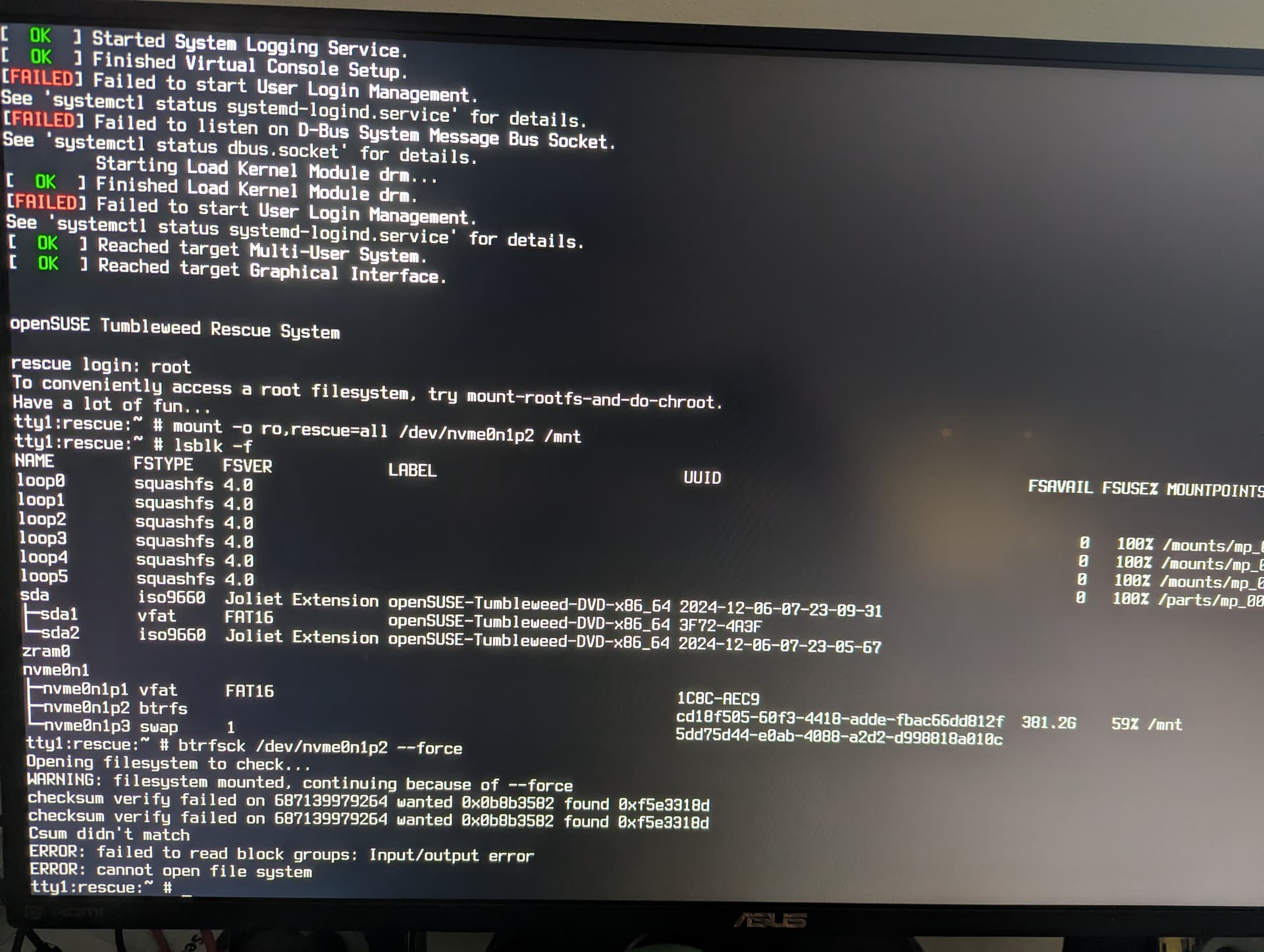
This is what I get (sorry for another picture):

I suggest reading some documentation … these should be very useful and informative - always advantageous to have a good understanding. These are both for 15.6:
.
.
And here are specific procedures for BTRS:
I agree with reading documentation. A few months ago, I had a catastrophic event with my BTRFS /. I eventually solved it, and summarized the two web pages I used to fix the issue, in addition to assistance from forum folks.
This is a snippet from the summary post - plus I’ve provided the link at the bottom of this post.
You might even read the complete thread for further information 
.
Summary post in my past thread:
2 Likes
You redirected the output so we do not see anything. If you cannot paste, then at least show it on the screen. And nothing stops you from booting into full GUI using live image, opening browser and pasting this content here.
Can you mount it with
mount -o ro,rescue=all /dev/nmvme0n1p2 /mnt
I did run the btrfsck without susepaste and the result is the same, the output stops at
Csum didn't match
ERROR:failed to read block groups: Input/output error
ERROR: cannot open filesystem
My sincere apologies but I couldn’t find how to run the .iso to boot into full GUI without installing. Is there a special version of tumbleweed .iso that lets me run GUI without installing the OS?
Is Krypton the one I should burn on the USB instead?
Sorry for bombarding you guys with noob questions, I know you are doing this in your spare time and I truly appreciate it.
Mounting it with the command you provided, and running btrfsck using --force says the exact same thing.
Hi, this weblink https://en.opensuse.org/openSUSE:Tumbleweed_installation may give you more insight. I would use this link for the .iso http://download.opensuse.org/tumbleweed/iso/openSUSE-Tumbleweed-KDE-Live-x86_64-Current.iso I use Suse Image Writer to transfer .iso images to usb medium usually. You are not supposed to use Ventoy to do so. I am certain more will respond also.
-Seasons greetings
1 Like
I use balenaEtcher to burn the .iso’s on USB. My spare computer is an old MacBook.
I will download the live version now and not the one that one has to install.
Thank you.
Oh man, when there is a problem, it rains problems. I have burnt bootbale usb’s 100 times in my life, but now this one i.e. openSUSE-Tumbleweed-KDE-Live-x86_64-Snapshot20241206-Media.iso won’t boot, the computer don’t even recognize it as USB. Is this media any different than others?
After 4 times writing a live usb and running it, every time it hangs on the tumbleweed logo and shuts down the computer. Failsafe option is the same. Does it have to be tumbleweed?
That, I am not certain of. Others will know more.
Where did I say running fsck after mounting?
So, you can mount in rescue mode. It means you should be able to copy files from this filesystem - if there is anything to copy.
You have two options
- You may try to repair this filesytsem. For this you need to find a way to provide the command output as text, not as photo. The very first thing that is needed is
dmesgoutput which may contain additional information. Anyway, show after mounting
btrfs filesystem show  /mnt
btrfs inspect-internal logical-resolve 687139979264 /mnt
- Copy whatever is to copy from this filesystem and reinstall.
The error does not look like bitflip. It may be due to hardware or software issues.
Which was when you should have posted providing kernel logs that still were available.
So what? You can copy text file to USB and transfer to another computer. You can boot live image with GUI and execute all these commands from there. Nobody forces you to boot into text mode.
Hi
Daft ideas as usual…
What I would do is get a working Live Distro, Debian or Linux Mint.
Boot from one of them and use Gparted to view the HDD/SSD
sudo apt install gparted if it is not included.
Then try and ID an area where you can get a gigabytes of space, maybe from a swap area, and install an opensuse there. Maybe try with 4 GB, but that would be minimal XFCE or similar I suspect.
THEN get you work/data off onto a large capacity external storage, and then vape the troubled area.
OR
https://gparted.org/livecd.php
- Manipulate file systems such as:
- btrfs
- exfat
- ext2 / ext3 / ext4
- fat16 / fat32
- hfs / hfs+
- linux-swap
- lvm2 pv
- nilfs2
- ntfs
- reiserfs / reiser4
- udf
- ufs
- xfsFor specific actions supported see detailed features.
I could not run live media of tumbleweed, the computer just refuses to boot and it just hangs. I managed to run Leap live media so at least I can perform the commands and paste them in GUI.
dmesg output → https://paste.opensuse.org/0820fb531de4
While inside the Leap live,
SimorghSUSE:/home/linux # mount -o ro,secure=all /dev/nvme0n1p2 /mnt
mount: /mnt: wrong fs type, bad option, bad superblock on /dev/nvme0n1p2, missing codepage or helper program, or other error.
       dmesg(1) may have more information after failed mount system call.
I bet I am not supposed to run the mount command with those parameters while inside live media, but I honestly don’t know.
I did not know better, I guess now it a lesson learnt.
1 Like
It is rescue=all. You could simply copy and paste from this topic.
It does not show more details except
/dev/nvme0n1p2 errs: wr 0, rd 0, flush 0, corrupt 6, gen 0
So, it is quite possible that you have more than one corrupted block, it just fails on the first one.
Sorry, did it the right way now.
SimorghSUSE:/home/linux # btrfs filesystem show  /mnt
Label: none  uuid: cd18f505-60f3-4418-adde-fbac66dd812f
        Total devices 1 FS bytes used 547.51GiB
        devid    1 size 929.02GiB used 548.05GiB path /dev/nvme0n1p2
SimorghSUSE:/home/linux # btrfs inspect-internal logical-resolve 687139979264 /mnt
ERROR: logical ino ioctl: No such file or directory
If I want to be able to access my /home directory to backup few .config file(s) and such, how can I do so? Do you think there is hope to salvage/repair the system?
Thank you in advance
Can you show
btrfs filesystem usage /mnt
while the filesystem is mounted?
OK, can you do
btrfs inspect-internal dump-tree /dev/nvme0n1p2 | grep -A3 687139979264
Show
cat /mnt/etc/fstab
Thank you for your patience, I truly appreciate your guidance and time.
As requested:
SimorghSUSE:/home/linux # btrfs filesystem show /mnt
Label: none  uuid: cd18f505-60f3-4418-adde-fbac66dd812f
        Total devices 1 FS bytes used 547.51GiB
        devid    1 size 929.02GiB used 548.05GiB path /dev/nvme0n1p2
SimorghSUSE:/home/linux # btrfs filesystem usage /mnt
Overall:
    Device size:                 929.02GiB
    Device allocated:            548.05GiB
    Device unallocated:          380.98GiB
    Device missing:                  0.00B
    Device slack:                    0.00B
    Used:                        547.51GiB
    Free (estimated):            381.23GiB      (min: 381.23GiB)
    Free (statfs, df):           381.23GiB
    Data ratio:                       1.00
    Metadata ratio:                   1.00
    Global reserve:              323.86MiB      (used: 0.00B)
    Multiple profiles:                  no

Data,single: Size:543.01GiB, Used:542.75GiB (99.95%)
   /dev/nvme0n1p2        543.01GiB

Metadata,single: Size:5.01GiB, Used:4.73GiB (94.40%)
   /dev/nvme0n1p2          5.01GiB

System,single: Size:32.00MiB, Used:32.00MiB (100.00%)
   /dev/nvme0n1p2         32.00MiB

Unallocated:
   /dev/nvme0n1p2        380.98GiB
SimorghSUSE:/home/linux # btrfs inspect-internal dump-tree /dev/nvme0n1p2 | grep -A3 687139979264
        key (16101814272 EXTENT_ITEM 8192) block 687139979264 gen 2498809
        key (16195534848 EXTENT_ITEM 4096) block 484389076992 gen 2498214
        key (16196812800 EXTENT_ITEM 8192) block 484389126144 gen 2498214
        key (16197914624 EXTENT_ITEM 4096) block 686859042816 gen 2498251
checksum verify failed on 687139979264 wanted 0x0b8b3582 found 0xf5e3318d
SimorghSUSE:/home/linux # cat /mnt/etc/fstab
UUID=cd18f505-60f3-4418-adde-fbac66dd812f  /                       btrfs  defaults                      0  0
UUID=cd18f505-60f3-4418-adde-fbac66dd812f  /.snapshots             btrfs  subvol=/@/.snapshots          0  0
UUID=5dd75d44-e0ab-4088-a2d2-d998818a010c  swap                    swap   defaults                      0  0
UUID=cd18f505-60f3-4418-adde-fbac66dd812f  /var                    btrfs  subvol=/@/var                 0  0
UUID=cd18f505-60f3-4418-adde-fbac66dd812f  /usr/local              btrfs  subvol=/@/usr/local           0  0
UUID=cd18f505-60f3-4418-adde-fbac66dd812f  /tmp                    btrfs  subvol=/@/tmp                 0  0
UUID=cd18f505-60f3-4418-adde-fbac66dd812f  /srv                    btrfs  subvol=/@/srv                 0  0
UUID=cd18f505-60f3-4418-adde-fbac66dd812f  /root                   btrfs  subvol=/@/root                0  0
UUID=cd18f505-60f3-4418-adde-fbac66dd812f  /opt                    btrfs  subvol=/@/opt                 0  0
UUID=cd18f505-60f3-4418-adde-fbac66dd812f  /home                   btrfs  subvol=/@/home                0  0
UUID=cd18f505-60f3-4418-adde-fbac66dd812f  /boot/grub2/x86_64-efi  btrfs  subvol=/@/boot/grub2/x86_64-efi  0  0
UUID=cd18f505-60f3-4418-adde-fbac66dd812f  /boot/grub2/i386-pc     btrfs  subvol=/@/boot/grub2/i386-pc  0  0
UUID=1C8C-AEC9                             /boot/efi               vfat   defaults                      0  2
This is extent tree block. Extent tree is where btrfs tracks allocated space. Theoretically it is possible to rebuild extent tree and it is also possible to force-rebuild checksums but that should only be done after having verified that no other corruptions exist. Which is unlikely given error statistic.
At this point as I already said it is better to try btrfs mailing list where there are developers who understand btrfs internals and can provide better guidance.
Unfortunately, it means btrfs cannot recover from corrupted block.
umount /mnt
mount -o ro,rescue=all,subvol=/ /dev/nmvme0n1p2 /mnt
and your /home is accessible as /mnt/@/home.
Thank you for your reply.
This is what I get:
SimorghSUSE:/home/linux # umount /mnt
SimorghSUSE:/home/linux # mount -o ro,rescue=all,subvol=/ /dev/nmvme0n1p2 /mnt
mount: /mnt: special device /dev/nmvme0n1p2 does not exist.
       dmesg(1) may have more information after failed mount system call.
That error (does not exist) is because the device is not spelled correctly.
“nmvme0n1p2”
…vs
“nvme0n1p2”
1 Like