Delete cookies and site data when Firefox is closed
but not anything like
Delete cache when Firfox is closed
Deleting cookies is very counterproductive; it means that I’ll have to do that two-factor-authentication horror again for a dozen sites that need me to be loggedd in, starting with all Google sites, and the ding-ding-ding from half a dozen Android devices around the house that want to tell the world that I logged in from some device they believe they don’t know.
In “Settings” → “Privacy & Security” go to section “History” and change “Firefox will:” to “Use custom settings for history”. Then mark “Clear history when Firefox closes” and click on its “Settings…” button and mark what you want to delete.
I think the united secret services of the world convinced browser vendors to keep as much of your browser history (URLs and the results also) on your disk as possible as default.
There’s a similar pet peeve with sites that very frequently update their webstore (storage/default/ in everyone’s profile directory). For example, Youtube and Twitch seem to constantly save the current state of viewing a video, stream or VOD, every few seconds, potentially causing SSD fatigue.
In order to reduce all these unnecessary writes, I’ve been using profile-sync-daemon-6.50-1.3.noarch for a few months:
# ~> rpm -qi profile-sync-daemon-6.50-1.3.noarch
Name        : profile-sync-daemon
Version     : 6.50
Release     : 1.3
Architecture: noarch
Install Date: Sun 27 Apr 2025 10:30:50 AM
Group       : Unspecified
Size        : 49328
License     : MIT
Signature   : RSA/SHA512, Sat 08 Mar 2025 10:25:47 PM, Key ID 35a2f86e29b700a4
Source RPM  : profile-sync-daemon-6.50-1.3.src.rpm
Build Date  : Sun 28 Apr 2024 09:01:58 PM
Build Host  : reproducible
Relocations : (not relocatable)
Packager    : https://bugs.opensuse.org
Vendor      : openSUSE
URL         : https://github.com/graysky2/profile-sync-daemon
Summary     : Symlinks and syncs browser profile dirs to RAM thus reducing HDD/SDD calls
Description :
Profile-sync-daemon (psd) is a tiny pseudo-daemon designed to manage your
browser's profile in tmpfs and to periodically sync it back to your physical
disc (HDD/SSD). This is accomplished via a symlinking step and an innovative
use of rsync to maintain back-up and synchronization between the two. One of
the major design goals of psd is a completely transparent user experience.
Distribution: openSUSE Tumbleweed
It can be started manually or using systemd, while logging in:
# ~> systemctl --user start psd.service
While it’s running, one can use psd p to look under its hood:
# ~> psd p
Profile-sync-daemon v6.50

 systemd service: active
 resync-timer:    active
 sync on sleep:   disabled
 use overlayfs:   disabled

Psd will manage the following per /home/user/.config/psd/.psd.conf:

 browser/psname:  firefox/firefox
 owner/group id:  user/1000
 sync target:     /home/user/.mozilla/firefox/default-release
 tmpfs dir:       /run/user/1000/psd/firefox.default-release
 profile size:    328M
 backup limit:    2
 recovery dirs:   none

# ~> _
Eventually, those 328 MB get written back to disk. When Firefox starts next time without the profile-sync daemon running, it will access its webstorage data on disk again like before.
The daemon does its job absolutely reliably in my experience. Regular backups of the data is recommended in any case (~/.mozilla or whatever it happens to be with Chrome-based browsers). Cheers!
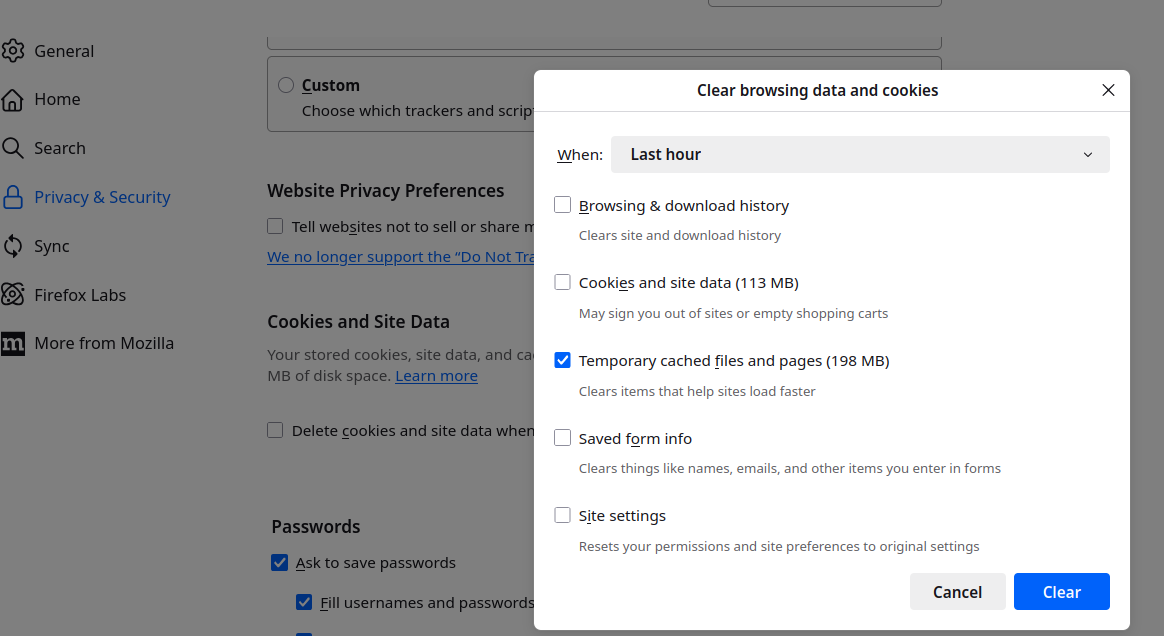
For the lazy and bone idle . . . as mentioned by another poster, you can “clear cache” from FF, they just don’t offer it openly the way they used to. >Settings >Privacy & Security >Cookies and site data >clear data opens window with options.
Checking mine a few minutes ago showed 1GB . . . upon clearing that and looking at a couple social media sites now 198MB . . . .
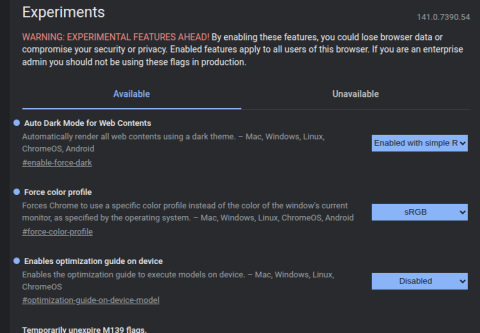
I just remembered an excessive disk-usage monster that many folks are unaware of … this is specific to Chrome browser (we don’t use Chromium, so not sure if is applies to it). And this excessive-usage is in the ~/.config sub-dir for Chrome. We also use (mostly) Brave, but I didn’t find the sub-dir for it.
I discovered the disk-usage (one single file) was OVER 4gb!!
So, there is a setting in Chrome that you set to Disable (see screenshot) called “optimization-guide-on-device”.
The other thing to do is delete the huge file, then recreate it (use touch command) and then set that file (called weights.bin) to Read-only. See below
.
I’ve been putting my browser cache in a RAM Disk forever. It really sped up old machines with a standard hard drive back in the day when it had to fetch/write to a HDD. Now it extends the life of an SSD by not writing to it constantly. I need to read/study what you’ve posted because I don’t have everything in /tmp like you do (not as much anyway).