I installed Tumbleweed on a USB flash drive. It’s an encrypted flash drive. Everything works fine.
I also use Tumbleweed on my desktop computer. When I connect the encrypted flash drive the system asks for the password. I enter it, but I get an error message about connecting the drive. Why?
Previously, I had Sparky Linux based on Debian on an encrypted flash drive, and after entering the password, it connected the drive. Tumbleweed should open the encrypted USB drive with Tumbleweed installed 
Is this additional security?
Should I install any additional packages?
You could at the very least show this error message. As well as explain what desktop environment you are using.
And of course details on the “encrypted flash drive” would be useful as well.
There is a message that this device cannot be connected.
Pendrive: Samsung 128GB BAR Plus Champaign Silver 400MB/s
Desktop system: Tumbleweed
Pendrive system: Tumbleweed, encrypted
Please note that we can not look over your shoulder. We depend on you posting exact facts, not your interpretation of the facts.
Thus better post the exact text.
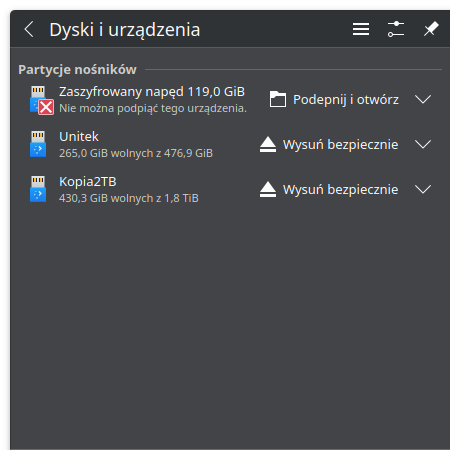
I Installed Debian Live 13.1.0-amd64-kde on Ventoy.
I tried it and connected an encrypted USB drive. I entered the password. I also got a message that the device couldn’t be connected, but it showed in Dolphin Manager and I could view the files. I can’t do this in Tumbleweed. The flash drive won’t mount.