The “tumbleweed” update this morning (zypper refresh && zypper dup) complains about a deleted providers: libQt6Core6-6.11.2-2.1.x86_64
This causes a series of following issues with all kinds of Qt6 software (plasma, libreoffice, kdenlive, qgis, …)
Since some of those are crucial for my work, I cannot chose “deinstallation” and select “keep obsolete” solutions.
Update: I found the SDB:KDE extra repo (via) but zypper concludes that that repo is invalid by now.
the URL was wrong but it does not provide the 6.11.2 version.
No you’re not alone. This conflict seems involving a lot of packages, in my system it avoid update of more than 300 packages.
And it’s not so rare too, in my system I have very often conflict during update.
The problem is in those programs, the maintainer(s) need to rebuild their packages… This is what I have with zero issues ( I use flatpaks ):
knurpht@Lenovo-P16:~> LANG=C zypper se -siv libqt6core6
Loading repository data...
Reading installed packages...

S  | Name        | Type    | Version    | Arch   | Repository
---+-------------+---------+------------+--------+-----------
i  | libQt6Core6 | package | 6.12.0-1.1 | x86_64 | repo-oss
    name: libQt6Core6

    Note: For an extended search including not yet activated remote resources please use 'zypper
    search-packages'.
knurpht@Lenovo-P16:~>
Yes, conflicting packages happen. This is obvious, as soon as you bring other repositories to openSUSE.
Normally these are resolved by a vendor change or a simple solution. I am quite happy with the way zypper handles conflicts and gives me options.
However, the libQt6Core is a different beast: it is a single breaking dependency for many GUI programs. I hope they will clear out what went wrong in the deployment pipeline.
Yes, maintainers need to re-build their packages, but even on tumbleweed there should be some period in which different versions of a dependency are accepted. It is not that libQt6Core6 dropped out of the blue, it just changed version. As an uninvolved user, I still have the impression something went wrong in this case.
That is what I was trying to say: not with the Plasma6.8 DE and apps. Which kdenlive, FreeCAD and others are not part of. And, as soon as 3rd party repos are involved anything can happen, but that is outside the distro’s control.
I thought kdenlive is part of the KDE ecosystem. And, as I mentioned in the first post and in my screenshot, even plasma itself was subject to issues (which might be derived issues from earlier choices). Even libreoffice was affected.
I agree that third party repos are out of the distro’s control. However, if you focus a distro on a single DE and stay agnostic to the rest of the world (e.g. removing providers without prior notice, not that anyone would do that), you would mess trust with your users and the broad community. Being open and cooperative with third party contributors is important. After all, they are like the familiar spice to a good dish
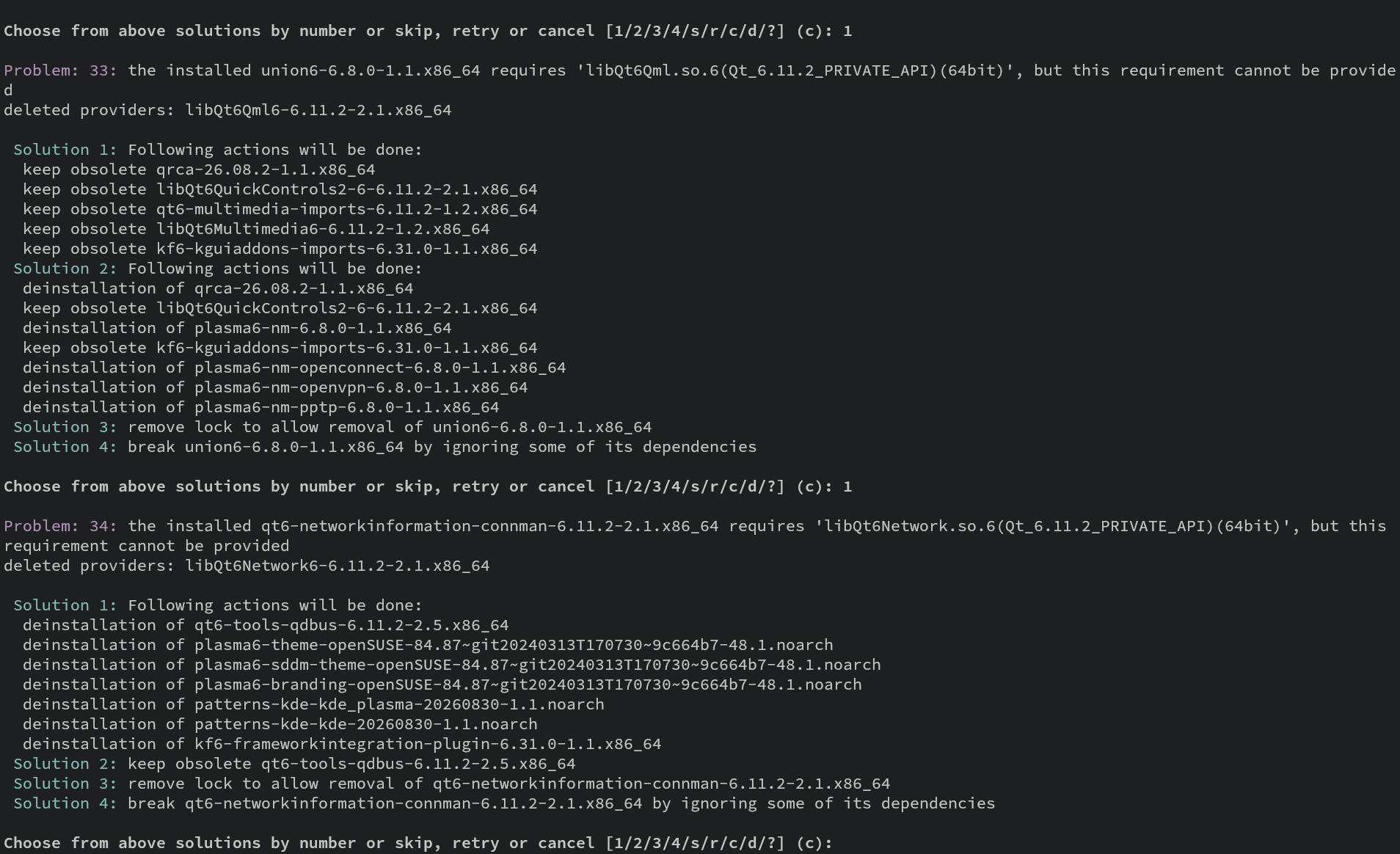
That repo list is a mess. Quite some duplicates and 3rd party repos, the latter being a guarantee for the issues you are having. For union6 your screenshot says the solver sees locking. Pick option 3 and report what happens
Thank you! It is my first attempt, coming from a different distro.
Could you point out please which are the duplicates or let me know the pattern I need to check myself?
Example: I now see that nvidia is in there twice. Indeed, I added one of them manually, the other must have been there from installation. I followed some guides after installation, maybe they were outdated. But then, what are the differences between cdn.opensuse.org and download.opensuse.org?
Yes, most of the third party repo’s are more or less mandatory for my work. Take the “Belgian eID” for example, or that MS crap. Or the browsers, just personal preference.
As you see, that one above in the screenshot was already “Problem 33”. I went on to 39, I think. Could it be that the locking happened because I selected “keep obsolete” on earlier choices? I guess then there is a “conflict of dependencies”, with some software demanding the previous version, and others the newer Qt6Core.
Could it be that the most likely cause of trouble is the X11_windowmanagers repo? That is hard to avoid…
My second guess would be packman. Apart from that, there is not much else, unless I overlook something?
I am hesitant to try out and ditch the window managers, I am so grown to qtile, risking that it won’t install after upgrade would be a huge loss in efficiency.
edit: just for the protocol… kdenlive remains the first one to crash on my system.
~# zypper info kdenlive
Refreshing [...]
Information for package kdenlive:
---------------------------------
Repository     : Main Repository (OSS)
Name           : kdenlive
Version        : 26.08.2-1.1
Arch           : x86_64
Vendor         : openSUSE
Installed Size : 72.6 MiB
Installed      : Yes
Status         : up-to-date
Source package : kdenlive-26.08.2-1.1.src
Upstream URL   : https://www.kdenlive.org/
Summary        : Non-linear video editor
Description    :
    Kdenlive is a non-linear video editor for GNU/Linux and FreeBSD, which supports
    DV, AVCHD (experimental support) and HDV editing. Kdenlive relies on several
    other open source projects, such as FFmpeg and the MLT video framework. It was
    designed to answer all needs, from basic video editing to semi-professional
    work.
Important plot twist:
Actually, kdenlive was the only package causing the issues. All the other “Problem” prompts seem to have been a consequence of my choice on that first one.
I uninstalled the package and was able to dup!
That loss of a video editor is workable for the time being.
Just to document the initial choices:
Problem: 1: the installed kdenlive-26.08.2-1.1.x86_64 requires 'libQt6Qml.so.6(Qt_6.11.2_PRIVATE_API)(64bit)', but this requirement cannot be provided
deleted providers: libQt6Qml6-6.11.2-2.1.x86_64

 Solution 1: Following actions will be done:
  keep obsolete libQt6Qml6-6.11.2-2.1.x86_64
  keep obsolete libQt6Xml6-6.11.2-2.1.x86_64
  keep obsolete libQt6Core6-6.11.2-2.1.x86_64
  keep obsolete libQt6Test6-6.11.2-2.1.x86_64
  keep obsolete libQt6QuickDialogs2Utils6-6.11.2-2.1.x86_64
  keep obsolete libQt6Network6-6.11.2-2.1.x86_64
 Solution 2: deinstallation of kdenlive-26.08.2-1.1.x86_64
 Solution 3: break kdenlive-26.08.2-1.1.x86_64 by ignoring some of its dependencies
I now tried [2] and [3], both seem to work, though nothing I would intuitively choose. I still have to test if kdenlive actually starts in the “broken” state.
This solves the issue for me!
It might be that two days ago, there were other packages which followed in line. However, as @knurpht and others pointed out, that is just a matter of maintainers updating with a delay.
Sorry for the confusion in my initial request: it is daunting to keep obsolete software or uninstall a program you depend on!
… and much appreciated that you pointed out these zypper tools, those add some more tricks to my personal repertoire. I would still like to get my repo’s straight, but can tinker on that myself at a later time. Thank you!
@Giorgio_os with this finding it seems unlikely that there are really 300+ packages affected on your system. You might want to check whether those are downstream issues because of the initial choices in the solver?
On top of this consistent system I use flatpaks. These by nature live isolated from the system ( even in my $HOME/.var ) and cannot touch or conflict with it.
 I will follow this bug and wait for a solution.


