i changed to
default.clock.quantum = 64
for a test.
thanks, tom kosvic
i changed to
default.clock.quantum = 64
for a test.
thanks, tom kosvic
with default.clock.quantum = 64, cracking started in about 15 minutes.
I went back to default values in man pipewire.conf. Will start over again by perturbing values when needed from these.
tom kosvic
Interesting, I don’t see that here. I hear crackling under heavy load (edit large photos in Darktable, heavy openCL spreadsheets…) but they stop once the heavy load is over.
Apparently there is some process in your system with ever growing “need for attention” by the kernel scheduler and pipewire falls behind at some point? Of course the tipping point is reached sooner with shorter buffers (i.e. with quantum=64), but nevertheless the situation should return to normal once the system is under lighter load again.
Cracking is ongoing annoyance. Only detected on youtube audio but haven’t given an app like vlc a long test by running music for many hours.
I did stop pipewire service to run on alsa alone when cracking was excessive on youtube. Cracking seemed improved but was still occurring. Will try this more whenever cracking is excessive to see if I can draw a firm conclusion.
Conclusion so far is cracking may not be caused by pipewire. Thus, tinkering with pipewire.conf parameters may not solve anything. That is what I have been finding previously.
FYI, tom kosvic
Sometimes I use pipewire as a “canary in the mine” to expose cpu overload or scheduler problems with low values (32-64) for default.clock.quantum.
When crackling begins, it is likely that an application is stealing cpu cycles, or memory cycles, or a kernel update messed up something and the like. If that happens with default values (1024 or so) I think that pipewire is “the canary”, not “the culprit”.
What about heavy cpu or memory users when cracking occurs? Your simulation jobs? Or spikes of network activities affecting YouTube and not VLC playing files on disk?
This starts to become an interesting saga 
@tckosvic have you inspected the route with the likes of qpwgraph? Could also be the bluetooth codec in use. I use JamesDSP to tweak sound here.
Cracking still ongoing pain. Only solved temporarily by reboot. Reboot is a pain that shouldn’t be necessary. My memory of 32gb, i7 – 12 core cpu is never close to being loaded. Process manager shows that continuously.
I wish to solve this. It should be solvable by software adjustment since cracking was not an issue for 5 years and has only become significant in the last year on the same computer.
If not too much of an imposition, I would like a plan as to how to modify pipewire.conf setting in some stepwise logical manner whenever cracking becomes severe. Start condition is the default settings.
My predominant audio use is listening to youtube that is run through vivaldi browser.
I ran qpwgraph and there were only 2 lines going directly from “chromium playback – output_fl and output_fr” to “gradoGW100 – playback_fl and playback_fr”. These are bluetooth headphones but bluetooth module is not connected in qpwgraph. The grado bluetooth headphones were working when qpwgraph was run. Sorry couldn’t figure out how to embed the image.
I’d like a plan as how to vary conf file parameters when cracking is encountered. I don’t yet have enough knowledge of audio and these parameters don’t have real meaning to me.
thanks, tom kosvic
Great headphones but, alas, bluetooth connected. If I were to place a bet I’d look for bluetooth buffer overrun rather than pipewire overrun.
Anyway the pipewire relevant part is quite simple. The relevant part in pipewire.conf is
    ## Properties for the DSP configuration.
    #default.clock.rate          = 48000
    #default.clock.allowed-rates = [ 48000 ]
    #default.clock.quantum       = 1024
    #default.clock.min-quantum   = 32
    #default.clock.max-quantum   = 2048
    #default.clock.quantum-limit = 8192
    #default.clock.quantum-floor = 4
then if you use vivaldi, which sends sound through pulseaudio, there is a corresponding section in pipewire-pulse.conf:
    #server.dbus-name       = "org.pulseaudio.Server"
    #pulse.allow-module-loading = true
    #pulse.min.req          = 128/48000     # 2.7ms
    #pulse.default.req      = 960/48000     # 20 milliseconds
    #pulse.min.frag         = 128/48000     # 2.7ms
    #pulse.default.frag     = 96000/48000   # 2 seconds
    #pulse.default.tlength  = 96000/48000   # 2 seconds
    #pulse.min.quantum      = 128/48000     # 2.7ms
    #pulse.idle.timeout     = 0             # don't pause after underruns
    #pulse.default.format   = F32
    #pulse.default.position = [ FL FR ]
which is somewhat self-explaining.
The point is, the longer a buffer is, the longer is the duration of a momentary disruption in the flow of data that can be “hidden” from the output.
With default settings you have:
in pipewire default.clock.quantum = 1024 or 22 ms at 1024/48000
in pulseaudio pulse.default.req = 960/48000 # 20 milliseconds at 960/48000
assuming the 48000 Hz sample rate that is a default for YouTube (and most sound over the net).
Of course that way you have a 20-22 ms delay (latency) in sound output but that is no big deal if you are just playing sound and not, say, live streaming.
The defaults look pretty conservative to me, but you can increase the values up to:
   pulse.min.req          = 1024/48000     # 22ms
   pulse.default.req      = 2048/48000     # 44 milliseconds
   pulse.min.quantum      = 1024/48000     # 22ms
and
    default.clock.quantum       = 2048
    default.clock.min-quantum   = 1024
    default.clock.max-quantum   = 4096
without the latency becoming annoying; going beyond those values means that something is severely broken in the system in my view, but could be done as a test.
I don’t think that other parameters are relevant (but I’m no pipewire guru ).
That said, please, please try to rule out bluetooth: use a wired headphone, or disconnect/reconnect the Grado instead of rebooting, or anything that can pause or reset the bluetooth stream, since every time I used BT I had problems one way or another.
Appreciate your time trying to educate me. I have also wired grado headphones. Sound is much better in wired but I think that is because they are “closed” and the wireless are “open”. But wireless are more convenient.
It is a valid test to evaluate whether cracking occurs with wired. I will first do that. If cracking does not happen, the issue could really be bluetooth. I’ll give that a couple of days.
Questions on your response. Do I modify both files simultaneously; or only in pipewire-pulse.conf since vivaldi uses that conf file. An ancillary question, I would assume that pipewire-pulse settings would dominate over pipewire.conf running from vivaldi; agree?
Additional question, what parameter would you first start perturbing?
thanks again, tom kosvic
pipewire-pulse and pipewire are two elements in the audio chain, not alternatives, so both might have an effect.
I would start by increasing pulse.min.req and pulse.min.quantum, then pulse.default.req. If that is not enough, I would increase the three other pipewire values.
You can see if those changes have any effect running pw-top and looking for changes in the QUANT and ERR columns.
So far 4 hrs on wired headphones with no spurious noises. Not yet a record.
If this continues, I need to diagnose bluetooth
tom kosvic
An update. Wired headphones have been in use for about 36 hours and used for sound from youtube about 15 hours with no cracking. Will run wired headphones for another two days.
If no cracking audio is encountered, I will conclude that alsa, pipewire, wireplumber audio is solid and not the root of cracking problems. Then, I will try troubleshooting bluetooth and try testing wireless headphones again but not modifying pipewire or pipewire-pulse config parameters.
thanks, tom kosvic
4 calender days and probably 30+ use hours on wired headphones with no cracking audio. Using vivaldi browser and youtube audio streams as before.
My alsa, pipewire, wireplumber problem has morphed into a bluetooth problem. All pipewire related configure parameters are at the default values.
I think I will start a separate thread on bluetooth issues after I start to perturb things. I am hoping that bluetooth functions are not inter-related with pipewire and can be diagnosed and treated independently.
thanks all, tom kosvic
I checked out of this thread some time back, but I’m not surprised about this, hence why I asked way back here?
Details are important.
No breakthroughs yet on bluetooth headphones cracking. My solution thus far is $5.99 for a 12 foot (approx 4 meter) extension cord for my wired headphones. This gives me the mobility I need. The wired headphones have had no cracking issues for 5 days now with approx 12 hour per day of active listening to the same sources that caused cracking with the wireless bluetooth headphones.
I am going to try another test soon. I can connect a wire to the wireless bluetooth headphones involved in the cracking making them wired. What I am using for wired headphones now is another completely different set of headphones (wired) from the same manufacturer. If cracking does not re-appear in the now wired (wireless) headphones, I can eliminate the physical construction of the wireless headphones as an issue.
Then I need to see what can be adjusted in bluetooth parameters or even bluetooth antenna.
thanks, tom kosvic
There is no Linux Bluetooth configuration that can be done top improve connection quality, I have been searching for interface counters but even these are not present or there are no well known tools to show them. With btmon I can capture data and btmon -a shows after installing gnuplot even some latency graphs but no RSSI.
With the distances you list (<10 meter) RSSI should no problem, those cracks are likely due to wireless interference.
Can you share the output of nmcli dev wifi list | perl -pe "s/(.{8}).{38}/\$1/", example.
Command output is below.
(base) tom@mydesktop: ~ $ nmcli dev wifi list | perl -pe "s/(.{8}).{38}/\$1/"
IN-USE  ODE   CHAN  RATE        SIGNAL  BARS  SECURITY
*       nfra  157   540 Mbit/s  84      ▂▄▆█  WPA2
(base) tom@mydesktop: ~ $
I saw that moving wifi to 5 ghz from 2 ghz might possibly reduce interferences with bluetooth that also runs at 2 ghz. There are also many references that say that is not accurate. I will give that a try after I run the wireless bluetooth headphones with the wired connection for a couple of days. Thus far no interferences on wired/wireless headphones.
thanks, tom kosvic
What codec are you using for transmission?
If I use aptX my bluetooth transmission becomes glitchy. When I switch to SBC the transmission is more stable. However SBC does not deliver the same sound quality.
Currently using codec AAC. I did not intentionally pick that. Must be a default from somewhere.
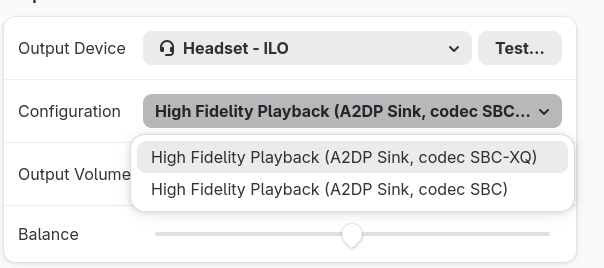
I assume AAC will start cracking again. For High Fidelity playback, I have codec choices of aptX, aptX-LL, SBC, SBC-XQ, and AAC.
There are also choices for Headset Head Unit (HSP/HFP) codec mSBC, CVSD, and no codec.
I will start testing with SBC-XQ and aptX.
thanks for your insights. tom kosvic