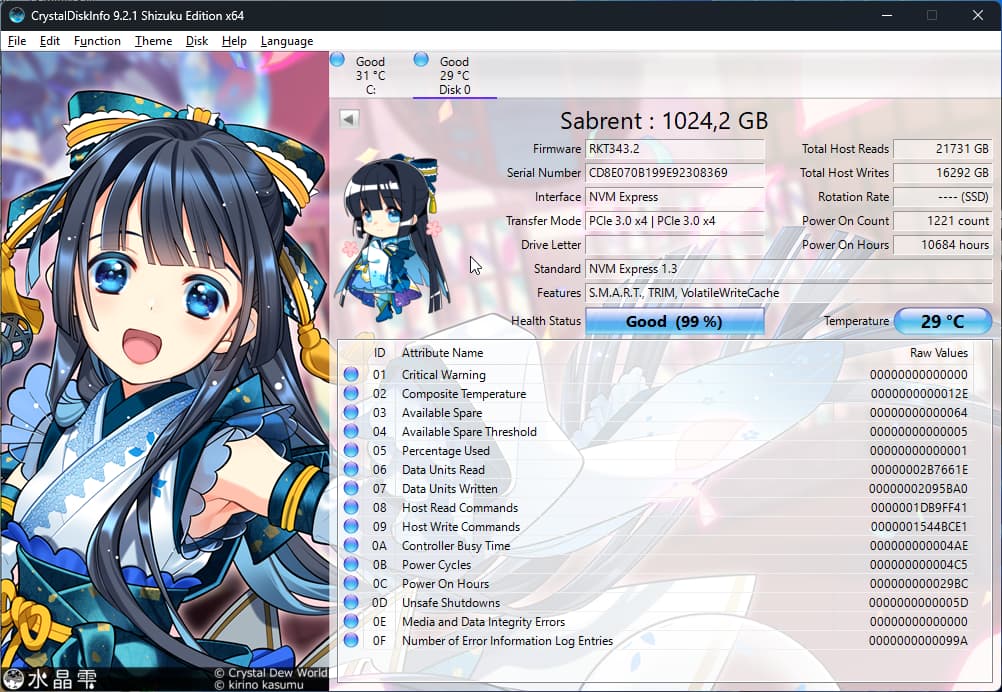
Hello there, I’m new to this forum so I hope I didn’t mess this post up. I don’t know if the issue is actually with my hardware but there’s a high chance it is.
First of all, let me preface that this issue only happens on my Opensuse Tumbleweed installation, and I’ve never seen it happen on my Windows 11 installation. Sometimes, with no clear pattern, my machine starts slowing down, until it finally hangs completely. When I press the hard reboot button on my case, it boots straight to my BIOS, and there I can see my two SSDs aren’t detected anymore and don’t appear as boot options. To start detecting them again, I have to turn off my computer completely and do a cold boot.
I have no idea how to diagnose the cause of this issue, somebody I know theorized a PSU fault, but in that case, why does it only happen on Tumbleweed? Again, there’s no real rhyme or reason to the crashes, sometimes it happens while doing stuff in Blender, sometimes it happens while playing videogames, sometimes I’m just streaming video or writing code, the only constant is Tumbleweed.
I tried updating my motherboard’s firmware and the problem stopped for like two days, enough to start getting my hopes up, before happening again today while playing Deadlock through Proton (sad because it works really well, especially when using the Vulkan renderer, better than natively on Windows!).
My specs are the following:
CPU: AMD Ryzen 7 3700X
Mobo: MSI B550 Gaming Plus
GPU: Gigabyte Nvidia Geforce RTX 3060 Ti
RAM: Crucial Ballistix 3200 MT/s, 16GBx2
SSDs: Two Sabrent Rockets NVMe, one is 2TB and contains the Windows partition, the other is 1TB and contains the Tumbleweed partition and the EFI partition
PSU: Bitfenix Whisper M 650W
This issue is the only reason I’m not using Tumbleweed as a daily driver yet so hopefully I can find a solution.
When you say doesn’t detect, are you able to reboot again somehow to find things normal, or are you now permanently stuck using Windows to visit here?
As you notice slowing down, do Ctrl-Alt-F3, login as root, and peruse journalctl -b and/or dmesg looking for clues, strings like error, fail, invalid, cannot, and so forth. You can upload those reports to susepaste and share the URLs to them here, e.g.:
Slowing down might mean overheating. Did you already open the case and check if there is a lot of dust? Are all the fans spinning?
You already wrote that it get worse when you computation-heavy tasks like gaming or 3D design; that points to that general direction of heat problems. Does your desktop have any sensors applet that you can use to monitor the internal temperature, the CPU temperature, the GPU temperature?
Basically, it doesn’t detect neither of my SSDs anymore until I completely shut down my computer, by holding the power button until the computer turns off and turning it back on (simply pressing the reset button doesn’t work). Until I do that, the only thing I can do is launching the UEFI interface, and neither Tumbleweed nor Windows can boot.
Also, the last time it happened (today before writing this post) something peculiar happened which didn’t happen the other times, and I didn’t even realize until after making my post: the opensuse-secureboot entry completely disappeared from my UEFI even after the cold boot, so I had to boot into the Opensuse Tumbleweed rescue image, chroot into my partition and run update-bootloader.
Anyway, I’ll keep those commands in mind for when it happens again. The crash happens very fast after the initial slowdown, but I’ll see what I can do. Thank you!
The computer seems clean enough on the inside, but I’ll try to do a deeper clean. I don’t have any applets like that tho, are there any that you recommend? Or even just some console commands I can run to monitor it? Thanks in advance.
Use myrlyn and search for monitor applets if you don’t find any already present in the starter menu for the DE you haven’t mentioned.
I agree with Stefan that heat is your most likely issue, quite likely the 1T NVME, which if not enough cooled down during button restart could need you to monkey around longer to give it more cool down time before being cool enough to be recognized again. NVMEs get hot. Some need extra cooling.
I don’t get why they put stickers on NVMEs that retard heat rejection and say do not remove else void your warranty. How are heat sinks supposed to be useful on those? You may want to check with Sabrent to see if it has suggestions or help to offer based upon your observations.
Hello! First of all, I was mistaken, I thought it wasn’t detecting any drive, but the only one which it wasn’t detecting was the 1TB SSD, the one with the EFI partition and the Tumbleweed partition. Sorry for my mistake
In that case, I strongly suspect that the culprit is overheating on the 1TB SSD, considering I checked CrystalDiskInfo and I get no warnings. (I apologize for the “kawaii” imagery on my CrystalDiskInfo btw)
One more reason why the culprit is probably the SSD is the fact that during the last crash I wasn’t doing any heavy calculation, but I was downloading stuff in the background.
For now, I’ll immediately proceed to backup the (few) important things I have on my Tumbleweed partition. Then I’ll do a clean up of the insides of my computer this weekend. If necessary, I will also buy a heat sink for my SSDs. Anyway, I’ll find a temp measurement applet for my DE (Plasma btw) and I’ll report how it goes ASAP. Thank you again to both you and Stefan.
Yes, my RAM is 32GB, 2 16GB sticks to be precise. The size of my swap partition is 48GB, so I doubt low virtual memory is the problem, since most of the apps I use aren’t particularly RAM-intensive, but I’ll still keep it in mind.
It’s just problematic if there is a thick coating of dust on heat sinks and electronic components, or on the blades of the fans. No need to do a super-thorough cleaning. If you are greeted by an army of dust puppies that clog everything when you open the case, you have a problem. If it’s just a bit dusty, that’s okay.
But make sure to check that your cooling fans are actually spinning, and that there is air flow over the components that get hot, and that the hot air can get out of the case again. Make sure that your SSDs have some breathing space to shed some of the heat; if they are sandwiched too close to each other, or to other components that get hot like the graphics card or the RAM modules, check if you can rearrange things in the case. Also make sure not to block air flow with all those flat and wide data cables.
Maybe also add an additional fan for some $15-20 if there is an opening in the case where you can put it. Just stay away from those small-diameter fans that come in 3 on a slot cover; they are incredibly noisy. Use one of those large fans the size of the one in the power supply. They also have a wire that acts as the heat sensor; put that near the components that get hot.
I’d stay away from swap space beyond 2 or 4 GB; if you need much more than that, and the kernel actually starts using it, the system will come to a screeching halt anyway with all the swapping. I’d rather have an honest out-of-memory (OOM) error than wait for minutes until the system reacts when I switch the browser tab.
I know that the kdump fetishists will disagree, but I have yet to see anybody making good use of such a huge kdump.
While I still didn’t do the cleanup, I noticed one of my case fans is not running. Granted, it’s only one out of 5, but I should definitely replace it. Anyway, I didn’t notice any big temperature spikes on my SSD, especially since the crashes often happen when I’m not at my computer, so I was thinking: Is there a way to log my temps to a file?
Btw, I have 48GB swap because I always do that ever since I read that the swap partition should be 1.5x the amount of RAM, so I may reduce it. Would I still be able to use hibernation if I used a smaller swap partition? Also, since I only have one distro on my computer, should I switch from a swap partition to a swap file? I know Linus recommends using swap partitions, but still
The required size for hibernation (suspend to disk) AFAIK depends on how much of your RAM is actually used. But just imagine that you want to resume from disk, and all your 32 GB of RAM actually need to be read: Is that really any faster than just booting normally? A systemd boot is really fast. And most of the time when booting or resuming is taken by the BIOS coming to life; it’s only the time between the boot prompt (the Grub2 menu) and your desktop being ready that is different.
I do suspend / resume to / from RAM with my laptop all the time; because that is really quick. But hibernate? Nah… I don’t think the time saving (if any) is worth the hassle.
And swap = 1.5 * RAM - that is advice from the last millennium, when common RAM sizes were in the MB, not GB range.
1.5xRAM is definitely overkill. The swap image is compressed, so it is always less than total RAM. Assuming that you are not using much swap during normal load (as @shundhammer advised) you should still be able to hibernate with less than 32 GB of swap. Here I have 16 GB RAM and a 8.6GB swap, I don’t advise everybody do that but that is an example to illustrate the concept.
It is not about being faster. It is about preserving your exact working environment and continuing where you left off (including in the middle of editing some file) instead of starting from the scratch.
I already have the “sensors” package installed, but is there a way to continuously query that command every 5 seconds or something and put the output in a text file? I know of the watch command, and that can be useful, but can I use it to write to file? Can I just use the append operator or do I have to do something a bit more complicated?
EDIT: found a way by using watch 'sensors | tee --append output', I’ll see if that can help diagnose the problem.
sensord logs sensors reading in the RRD (Round Robin Database) that can be visualized later using any tool of your choice. This way you can store historical data for months and years for easy comparison.
Suspend to disk is safe even in case of a power outage. In case that resume from hibernate fails (not a rare situation in my system), I can try to repeat until it succeeds (important feature for me). Therefore I mostly prefer S4/hibernate over S3/suspend to RAM, even though the latter is much faster and more reliable on my system.
Generally, I wonder why boot times seems to be such a strong argument to many. I use to reboot once or twice in several months, normally for patching/updating or when resume from S4 fails and the computer reboots without asking. Boot times and boot graphics do not matter to me, but stability, configurability and dependability does.
On Tumbleweed? One could consider this system vulnerable and unmaintained. When running a rolling release, fixes and corrections get permanently introduced. By not applying them ( restart for kernel and drivers and more required) there is no sense in running a RR at all.