@40476 you need to add a force_id modprobe.d or a grub/systemd boot option… If you run sensors-detect --auto does it show a hex number for the sensor?
How exactly would i do that?
Driver `nct6775':
  * ISA bus, address 0xa20
    Chip `Nuvoton NCT5532D/NCT6779D Super IO Sensors' (confidence: 9)
@40476
For grub add nct6775.force_id="0xa20" at boot…
If systemd-boot then it would be pbl add-option nct6775.force_id="0xa20" and then run sdbootutil -v add-all-kernels
Or add a /etc/modprobe.d/01-nct6775.conf file containing options nct6775 force_id="0xa20" and run dracut -f --regenerate-all and reboot.
2 Likes
Some PWM fans can be controlled using DC, and OP claimed their fans are compatible with both control modes.
This was extremely helpful and I’ll bookmark it for future reference in case I ever run into issues with a control chip again.
I tried a few different chip id but still could not get it to work, coolercontrol still resets the target speed to 2%
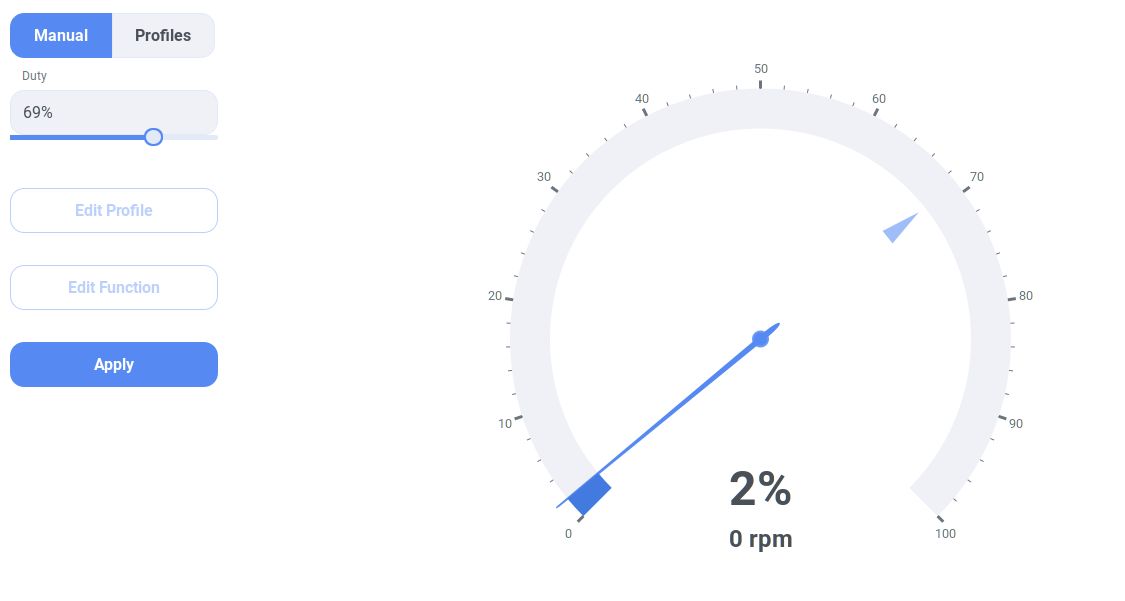
Sorry for nitpicking, but in the screenshot it looks like the target is set to 69% but the reported speed is 2% / 0 RPM.
Is the screenshot of Coolercontrol from the settings for fan 6 or 7?
Because Coolercontrol incorrectly shows 2% just like your previous sensors output shows for pwm6 and pwm7, in this message.
I don’t think it’s Coolercontrol’s fault. There’s probably still something wrong with the driver or sensors.
Did you run sudo sensors-detect and save the changes after forcing the driver to target your specific chip?
If yes, did you also run sudo systemctl restart coolercontrold?
I did run all those commands, I also cannot find a list of the different id codes for the different chips.
I definitely agree with your statement about the driver, something is definitely not working right.
In my experience coolercontrol automatically reconfigures chips if the come back online under a different id but I did restart it anyway
I’m already way over my head here, but the kernel.org page you linked shows:
Nuvoton NCT5532D/NCT6779D
Prefix: ‘nct6779’
Addresses scanned: ISA address retrieved from Super I/O registers
Datasheet: Available from Nuvoton upon request
Maybe @malcolmlewis can enlighten us: What does this prefix mean and should it be used somewhere with force_id?
@hyperdolphins that is the available kernel module…
ls /usr/lib/modules/`uname -r`/kernel/drivers/hwmon/ will show them all.
Prefix is the module name. but the nct6775 seems to be very generic and used in this case.
@40476 If yo enable control in the BIOS, does sensor output change for the pwm output from “Manual Control”?
.rw-r--r-- 15k root 13 May 05:49 nct6683.ko.zst
.rw-r--r-- 36k root 13 May 05:49 nct6775-core.ko.zst
.rw-r--r-- 5.9k root 13 May 05:49 nct6775-i2c.ko.zst
.rw-r--r-- 21k root 13 May 05:49 nct6775.ko.zst
.rw-r--r-- 4.5k root 13 May 05:49 nct7363.ko.zst
.rw-r--r-- 14k root 13 May 05:49 nct7802.ko.zst
.rw-r--r-- 8.5k root 13 May 05:49 nct7904.ko.zst
.rw-r--r-- 8.9k root 13 May 05:49 npcm750-pwm-fan
This topic was automatically closed 30 days after the last reply. New replies are no longer allowed.