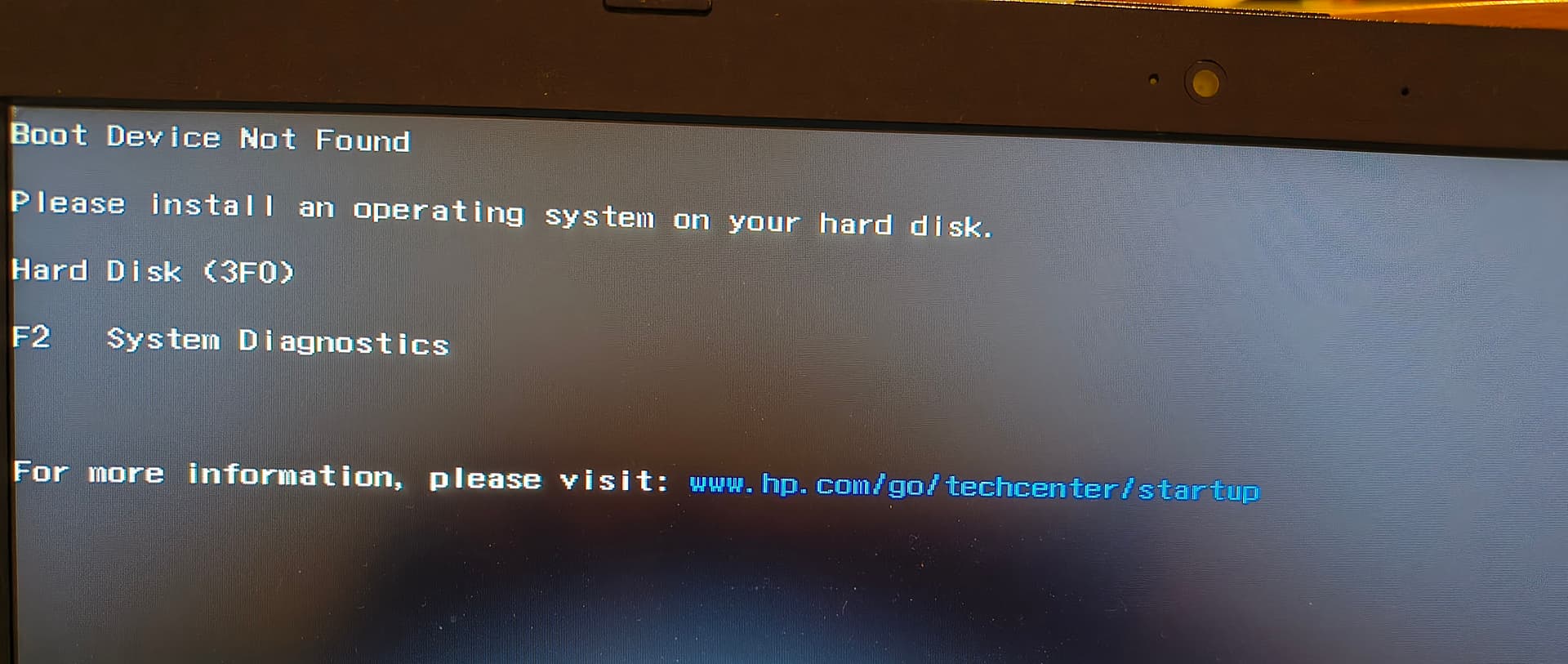
Please start your openSUSE Tumbleweed system (with SuperGRUB disk) and show the results of
cat /etc/sysconfig/bootloader
and
bootctl
and
efibootmgr
and
cat /etc/fstab
Please start your openSUSE Tumbleweed system (with SuperGRUB disk) and show the results of
cat /etc/sysconfig/bootloader
and
bootctl
and
efibootmgr
and
cat /etc/fstab
~> cat /etc/sysconfig/bootloader

## Path:        System/Bootloader
## Description: Bootloader configuration
## Type:        list(grub,grub2,grub2-efi,grub2-bls,systemd-boot,none)
## Default:     grub2
#
# Type of bootloader in use.
# For making the change effect run bootloader configuration tool
# and configure newly selected bootloader
#
#
LOADER_TYPE="grub2-efi"

## Path:        System/Bootloader
## Description: Bootloader configuration
## Type:        yesno
## Default:     "no"
#
# Enable Secure Boot support
# Only available on UEFI systems and IBM z15+.
#
#
SECURE_BOOT="yes"

## Path:        System/Bootloader
## Description: Bootloader configuration
## Type:        yesno
## Default:     "yes"
#
# Update nvram boot settings (UEFI, OF)
# Unset to preserve specific settings or workaround firmware issues.
#
UPDATE_NVRAM="yes"
===================================================
~> bootctl
Failed to read "/boot/efi/EFI/systemd": Permission denied
Failed to open '/boot/efi/loader/loader.conf': Permesso negato
System:
      Firmware: n/a (n/a)
 Firmware Arch: x64
   Secure Boot: disabled
  TPM2 Support: yes
  Measured UKI: no
   Measured OS: no
  Boot into FW: supported
 Platform Lang: en_US.UTF-8

Random Seed:
 System Token: not set
       Exists: Can't access /boot/efi/loader/random-seed (Permission denied)

Available Boot Loaders on ESP:
          ESP: /boot/efi (/dev/disk/by-partuuid/5d823e21-8a18-4f3e-815b-04648af03ddf)
         File: (can't access /boot/efi: Permission denied)

Boot Loaders Listed in EFI Variables:
        Title: openSUSE
           ID: 0x0008
       Status: active
    Partition: /dev/disk/by-partuuid/5d823e21-8a18-4f3e-815b-04648af03ddf
File: └─/boot/efi//EFI/opensuse/grubx64.efi
===================================================
~> sudo efibootmgr
[sudo] password di root:
BootCurrent: 0000
Timeout: 0 seconds
BootOrder: 2001,2002,2004
Boot0000* USB Hard Drive (UEFI) - JetFlashTranscend 4GB PciRoot(0x0)/Pci(0x14,0x0)/USB(0,0)/HD(1,MBR,0x35b6964c,0x1800,0x64801)RC
Boot0008* openSUSE      HD(2,GPT,5d823e21-8a18-4f3e-815b-04648af03ddf,0xe1800,0x31800)/File(\EFI\opensuse\grubx64.efi)RC
Boot2001* EFI USB Device        RC
Boot2002* EFI DVD/CDROM RC
===================================================
~> cat /etc/fstab
UUID=7d650f0f-b9ce-471d-ab8c-1a035660c750  /          ext4  defaults         0  1
UUID=881bb5b8-441e-4ad6-9540-31ee02501eca  /home      xfs   defaults         0  0
UUID=1433-F888                             /boot/efi  vfat  utf8,dmask=0077  0  2
Use the SuperGRUB disk to start your openSUSE Tumbleweed system, open a terminal and run as “root”
update-bootloader --install
followed by
update-bootloader --config
and then reboot your system.
No change, no bootloader.
~> su -
Password:
localhost:~ # update-bootloader --install
localhost:~ # update-bootloader –config
@Giorgio_os if you go into your system BIOS can you set the boot order there, or browse to an efi file and select the openSUSE one?
If you boot the system and then as root user efibootmgr -n 8 then reboot does that work?
Was there really no bootloader installed (or does your system just not boot)?
Please use the SuperGRUB disk to start your openSUSE Tumbleweed system, open a terminal and show the results of
ls -laR /boot/efi
and
efibootmgr
I had several “item” in BIOS, at least two opensuse, one ubuntu (linux mint) and so on. At present no more “item” to select in BIOS.
Done. Nothing change, still error message at switch on.
~> sudo efibootmgr -n 8
[sudo] password di root:

BootNext: 0008
BootCurrent: 0000
Timeout: 0 seconds
BootOrder: 2001,2002,2004
Boot0000* USB Hard Drive (UEFI) - JetFlashTranscend 4GB PciRoot(0x0)/Pci(0x14,0x0)/USB(0,0)/HD(1,MBR,0x35b6964c,0x1800,0x64801)RC
Boot0008* openSUSE      HD(2,GPT,5d823e21-8a18-4f3e-815b-04648af03ddf,0xe1800,0x31800)/File(\EFI\opensuse\grubx64.efi)RC
Boot2001* EFI USB Device        RC
Boot2002* EFI DVD/CDROM RC
ls -laR /boot/efi give a long text, I’ve copied it in text file (around 20 kB) but I don’t find any way include in this reply
:~> sudo efibootmgr
BootCurrent: 0000
Timeout: 0 seconds
BootOrder: 2001,2002,2004
Boot0000* USB Hard Drive (UEFI) - JetFlashTranscend 4GB PciRoot(0x0)/Pci(0x14,0x0)/USB(0,0)/HD(1,MBR,0x35b6964c,0x1800,0x64801)RC
Boot0008* openSUSE      HD(2,GPT,5d823e21-8a18-4f3e-815b-04648af03ddf,0xe1800,0x31800)/File(\EFI\opensuse\grubx64.efi)RC
Boot2001* EFI USB Device        RC
Boot2002* EFI DVD/CDROM RC
Load the file up to paste.opensuse.org and post the link here.
In the meantime you can try:
Use the SuperGRUB disk to start your openSUSE Tumbleweed system, open a terminal, become “root” and do
efibootmgr -o 0008,2001,2002
then restart your system.
No change.
Please show the exact error message you receive on startup (take photo of screen if appropriate).
Already posted in reply 13.
So this is the only text you will see when you start your system - no other text directly before or after that message?
I would boot up a live usb and try to upgrade the system. It worked for me in the past on my win11/tumble laptop. A Windows update took over the boot process, but the update process restored grub.
Already tried without success.
Do I understand this correctly: If you switch on your machine you will end up with that screen?
To start from the SuperGRUB disk are you invoking the BIOS Boot Selection (by pressing some special key on startup) and select the SuperGRUB disk for startup there?
Does the BIOS Boot Selection offer any of the operating systems installed on your machine (e.g. MS Windows, Mint, openSUSE Tumbleweed, …) and if so can you select them and will they start?
@Giorgio_os And if not so, can you boot the system (by rescue live media, supergrub disk or similar) and from the running system check if shimis installed and install it if it isn’t there?
...
/boot/efi/EFI/opensuse:
totale 5413
drwx------  2 root root    1024 22 lug 21.38 .
drwx------ 10 root root    1024 28 set 19.08 ..
-rwxr-xr-x  1 root root      58 29 set 14.49 boot.csv
-rwxr-xr-x  1 root root     345 29 set 14.49 grub.cfg
-rwxr-xr-x  1 root root 2361200 29 set 14.49 grub.efi
-rwxr-xr-x  1 root root  167936 29 set 14.49 grubx64.efi
-rwxr-xr-x  1 root root  923880 29 set 14.49 MokManager.efi
-rwxr-xr-x  1 root root 1042040 29 set 14.49 shim.efi
-rwxr-xr-x  1 root root 1042048 29 set 14.49 shim.non-nx.efi
...
from post #30