I tried another distro ( F word), with kernel 7.0.9 and nvidia driver 595.71.05
It has no issues.
Before to try this, I’ll wait for 7.0.9 (as @csrinivas said in the other distro) to see if 7.0.9 fixes the issue.
BTW, your advice to make the .service is with or without adding the parameter initcall_blacklist=sysfb_init?
Regards
Not the systemd service or something, you need to add it to the Kernel CMDLINE.
(or maybe I misunderstood your question?)
If the initcall blacklist is working for you then you don’t need the systemd service to reset the card. And vice versa I guess ( I have not tried the reset service).
1 Like
@simonsan @meaglyn I tried here with initcall_blacklist=sysfb_init added in the parameters of the kernel.
I added in the green square when I did the try, after nvidia-drm.modeset=1:
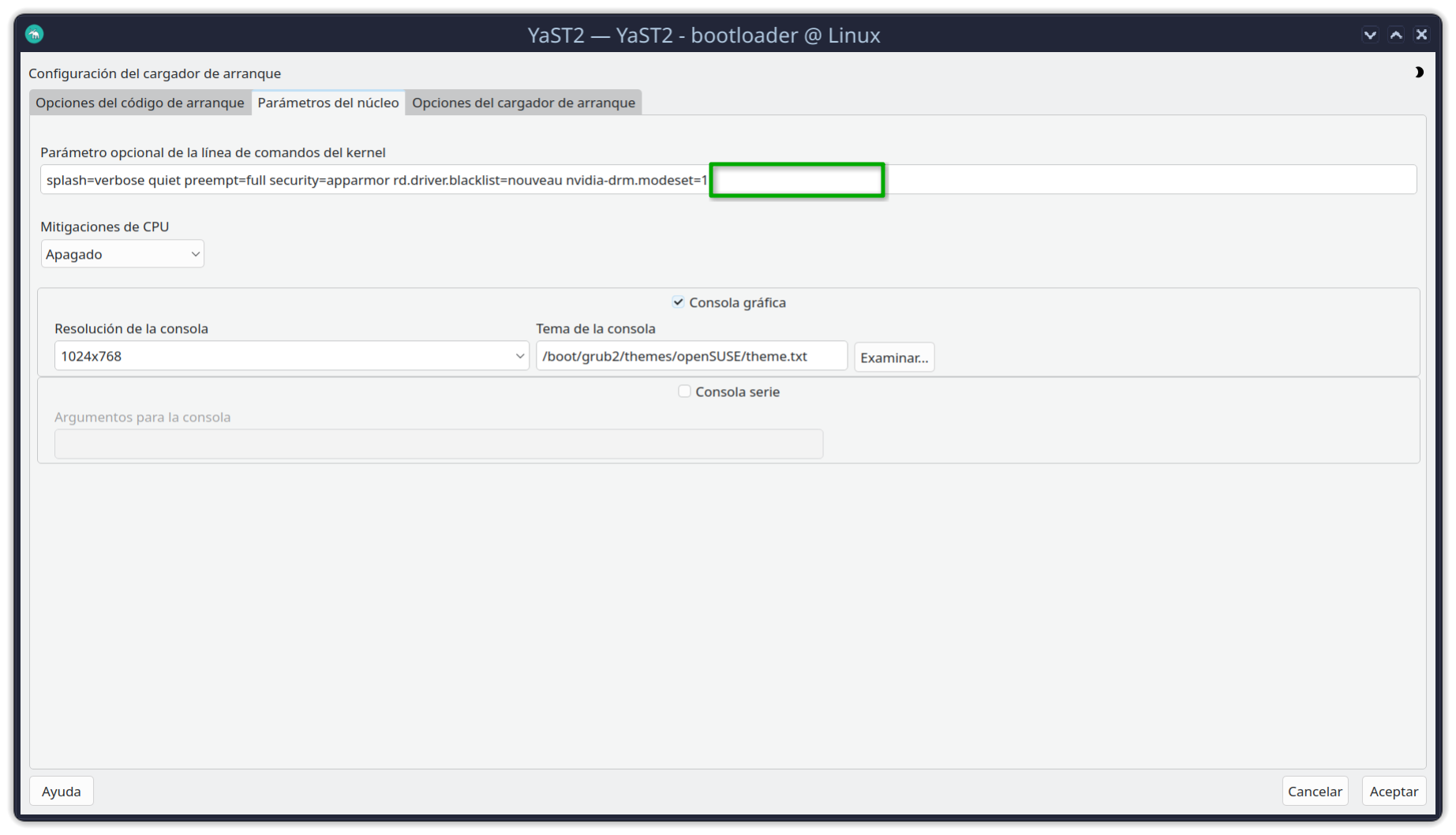
Regards
I see now where you say the initcall blacklist did not work for you. Sorry I did not read that far back. So then you could try the systemd service. You don’t need both though. If the blacklist thing did not work take it out and just try the other workaround. Again, I have not tried that one so I have nothing to add about it.
And fwiw, I do not have the nvidia-drm.modeset=1 part. That may be the default anyway so it might not matter but it might be worth trying the blacklist thing without that? Dunno.
Without nvidia-drm.modeset=1, gamescope don’t work in Steam.
Regards
There has been a new nVidia driver released (580.159.03-54.1). No changes, without initcall_blacklist=sysfb_init → Black screen. With initcall → KED fully functional.
1 Like
I don’t have initcall_blacklist=sysfb_init set as a boot flag. The added systemd service does the job for me without it so I don’t think it should matter if you have it set or not except that you will see early boot messages if initcall_blacklist=sysfb_init isn’t set.
I stored today your post with the steps to make the .service. Monday I’ll try if Kernel remains doing the same (I saw that less of 1 hour ago, TW shipped Kernel 7.0.9).
Regards
Have tried your solution. Does not work for me, nvidia-smi --gpu-reset
exits with status=255 and:
GPU 00000000:01:00.0: In use by another client
1 device is currently being used by one or more other processes
Maybe the nvidia persistence daemon is interfering. You could try changing the line in the service file from “After=sysinit.target” to “Before=nvidia-persistenced.service” if you think it’s worth your while. If initcall_blacklist=sysfb_init is working for you then maybe it’s not worth the hassle.
Ok, my 3070 ti isn’t here yet (tomorrow or sat  ) so I’m still just shooting in the dark, but initcall_blacklist=sysfb_init goes a little too far. So this is what I did on my working system:
Hit “e” at the grub menu and installed added initcall_debug to the command line. This causes all the initcalls to be written to Dmesg (100’s)
Then I did dmesg | grep -E 'initcall' | grep -E 'fb|framebuffer|simple|drm|sysfb|efifb|vesafb' and came up with this list
windeath:/home/dart # cat initcall.txt
[    0.315537] [      T1] initcall efi_earlycon_remap_fb+0x0/0x70 returned 0 after 0 usecs
[    0.385682] [      T1] initcall fbmem_init+0x0/0x50 returned 0 after 0 usecs
[    0.559980] [      T1] initcall libaescfb_init+0x0/0x1a0 returned 0 after 5 usecs
[    0.567508] [      T1] initcall drm_core_init+0x0/0xa0 returned 0 after 160 usecs
[    0.567522] [      T1] initcall efidrm_platform_driver_init+0x0/0x20 returned 0 after 5 usecs
[    0.567535] [      T1] initcall simpledrm_platform_driver_init+0x0/0x20 returned 0 after 5 usecs
[    0.567547] [      T1] initcall vesadrm_platform_driver_init+0x0/0x20 returned 0 after 5 usecs
[    0.868085] [      T1] initcall sysfb_init+0x0/0x1a0 returned 0 after 7796 usecs
[    0.868143] [      T1] initcall framebuffer_driver_init+0x0/0x20 returned 0 after 5 usecs
[    0.925380] [      T1] initcall efi_earlycon_unmap_fb+0x0/0x50 returned 0 after 0 usecs
[    8.863947] [    T596] initcall nv_linux_drm_init+0x0/0xff0 [nvidia_drm] returned 0 after 22328 usecs
windeath:/home/dart #
Maybe initcall_blacklist=simpledrm_platform_driver_init (or one of the others) might be a little less of “caveman” tactic and let people see boot msgs? If they are so inclined to test of course 
Will get fully into it when my 3070 ti gets here
1 Like
My journalctl kernel messages include the line
efi-framebuffer efi-framebuffer.0: [drm] Registered 1 planes with drm panicwhich apparently can mean that the dedicated graphics card is failing to take over from the basic UEFI framebuffer.
2 Likes
Excellent … now we may be getting somewhere … although I have grub2-efi I have no actual efi (board too old) … so maybe try blacklisting the efi entries in my list or just the ones you DON’T see in your dmesg 
Edit: also maybe try video=efifb:off in your kernel command line. I think that is the right param
1 Like
@dart364 AFAIK newer Nvidia GPU’s will only work with a UEFI BIOS?
This option bailed me out today with the kernel:7.0.9-1 
1 Like
I haven’t heard anything about that … define “newer” please … that would seem to be pretty dumb on Nvidia’s part IMHO … everything they need to operate should be on the card right?
@dart364 You need to google around “What Nvidia cards require UEFI BIOS”…