Any one wants to try this. It’s been in my /etc/modprobe.d since year 2022.
I can’t think of something why my RTX3050 is working on my machine. I remember I had this
config so want to share if someone wants to try and might work for you.
In /etc/modprobe.d/50-nvidia-power-managent.conf
It contains these lines.
For the tearing, blank screen on login and blank screen after suspend in wayland this is the option
options nvidia NVreg_EnableGpuFirmware=0
For explanation of what is it please just do some search as I am not very technical in explaining.
When all is well in the coming newer kernel just comment that last line.
blacklist nouveau

softdep nvidia post: nvidia-drm nvidia-uvm
options nvidia-drm modeset=1

##Power Management
## Disable runtime D3 power management features
##options nvidia NVreg_DynamicPowerManagement=0x00
## Allow the GPU to go into its lowest power state when no applications are running
##options nvidia NVreg_DynamicPowerManagement=0x02
## Default option disables runtime D3 power management feature
##options nvidia NVreg_DynamicPowerManagement=0x03
## For suspending, make sure not using tmpfs!
options nvidia NVreg_PreserveVideoMemoryAllocations=1
options nvidia NVreg_TemporaryFilePath=/var/tmp
## Enable the PAT feature
options nvidia NVreg_UsePageAttributeTable=1
## Support for CUDA Stream Memory Operations in user-mode applications.
options nvidia NVreg_EnableStreamMemOPs=1
Hiya. I have run that command on three different configurations: 7.0.6, 7.0.6 with initcall_blacklist=sysfb_init hack and 6.18.29. Here are the results I got:
Nothing really weird going on my PC. Second one got renamed to card0 because card0 was supposed to be efidrm but that kernel parameter explicitly skips its initialisation.
G06 package structure got changed down the line. What used to be kernel-firmware-nvidia-gspx-G06 is now part of nvidia-common-G06. G07 just did the same. What does zypper se -si nvidia says? Maybe you have some leftover older G06 packages recommending you junk.
Are defaults set either by Nvidia or OpenSUSE nowadays. Could be omitted.
options nvidia NVreg_DynamicPowerManagement=0x02 is alright if power is a concern.
options nvidia NVreg_EnableGpuFirmware=0 disables GPU’s GSP (GPU System Processor). It is responsible for GPU initialisation, management tasks and offloading CPU tasks to reduce latency. Unless it causes severe issues I strongly recommend not touching it.
Well, I migrated both my systems to systemd-boot for various reasons (mainly boredom). For whatever reason, the boot process changed enough for me not to be able to reproduce this issue at all. I did notice that systemd-boot is using a higher resolution than grub2-efi before the nvidia driver kicks in, but even when forcing a lower resolution at the start of the boot, sddm loads just fine.
Unfortunately, however, after the latest update my main system has started to exhibit the frustrating screen blanking issue I’ve had on and off for a while, and which I though I had resolved months ago by not using adaptive sync… an issue for another thread, I suppose.
Hi! Here is my take on this issue. I have been doing sypper rff/dup since the very first version of kernel 7.0.* on TW. All the time blck screens during booting but usually boot number 3 has brought the sddm on screen - and if that happens, login goes ok. But plasma has been very unstable, flickering, suddenly freezing without any warning.
Last week: plasma goes up and nvidia card responses quite well but after 30 min of using my PC, it stucks - black screen but alt-sgift-f4 and login as root has made reboots available. Today I have added this kernel parameter initcall_blacklist=sysfb_init and TW has been working ok. Even screen lock (first time for 3 weeks) resumes ok.
Hi all
I have a similar configuration as scoutboy except my graphic card is a GeForce RTX 4070 Ti. The initcall_blacklist=sysfb_init fixed the black screen issue for me as well. The downside is, that there is no screen output during boot and if there is any kind of problem you are absolutely blind. @Lioli7k:
Do you have any information form the dev’s if they are aware of the problem and/or if they are working on a fix ?
I can’t boot with Kernel 7.0+ (I tried 7.0.1, 7.0.3, 7.0.5 and 7.0.7) with R595 driver (I tried 595.71.05, 595.58.03 and 595.44.07) using the .run file. Never I had problems with .run driver.
I boot with Kernel 7.0.7 (and previous versions) in multi-user mode (no X environment), installl the driver .run (compile modules, install driver and 32bit libraries, rebuild initramfs) and reboot.
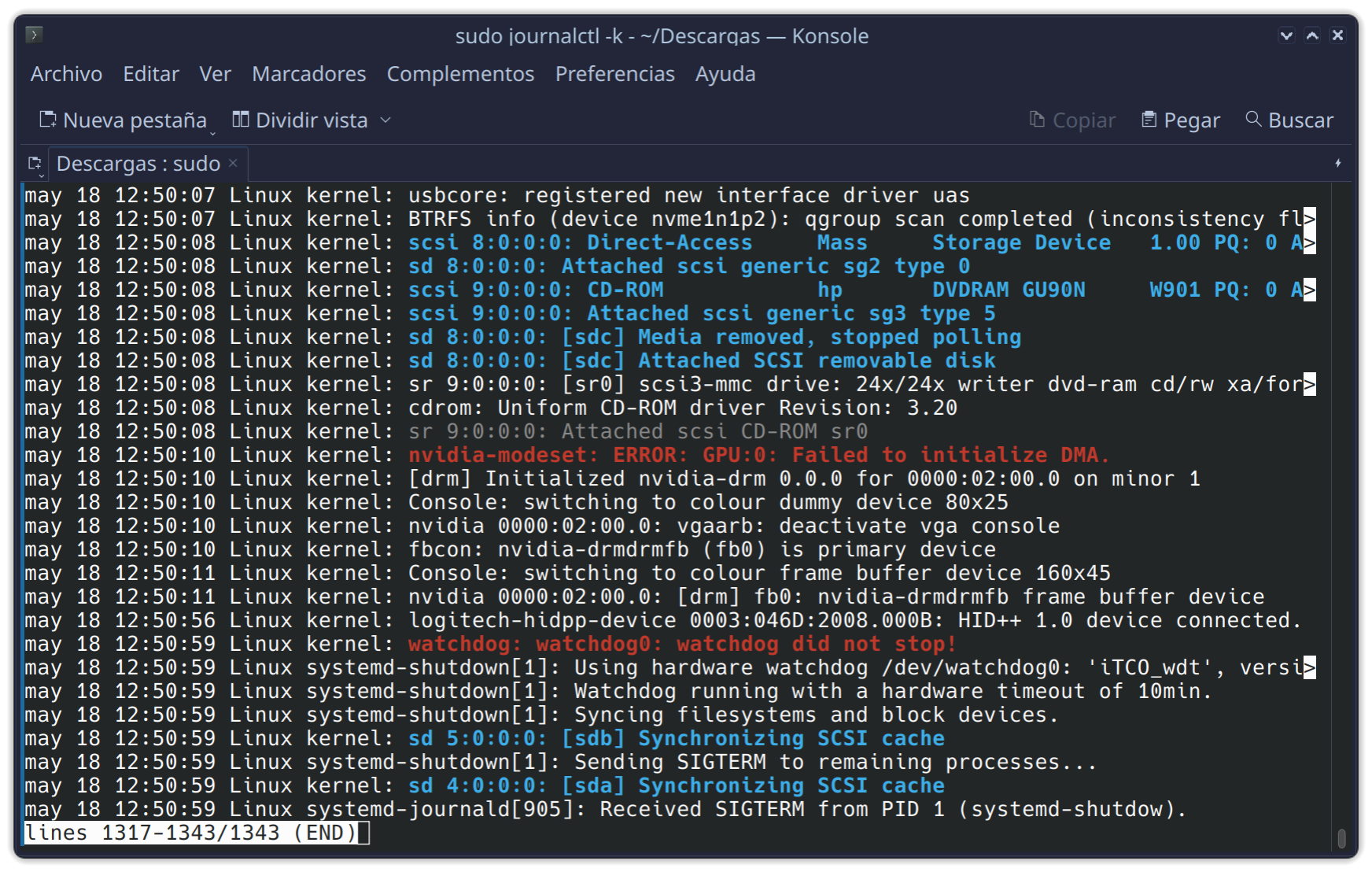
From now, is impossible boot with Kernel 7.0+. I have the sudo journalctl -b -k -2. Final lines:
This looks like the same issue around framebuffer/modeset everybody is having.
Most people seem to be able to work around it with the method posted by @Zlinux1here
However you’re using the .run file from nvidia which I wouldn’t do unless I needed to for some reason. You should be able to get a functioning system on kernel 7.0.7 by using @Zlinux1’s fix and by installing the open nvidia driver as detailed here. .
Alternatively you could create a systemd service workaround as I have but that is slightly more work. It doesn’t hide boot messages though which is one advantage.
Just updated my system to 7.0.7 with G06. Black screen on first reboot, but adding initcall_blacklist=sysfb_init to the kernel line seems to have mitigated it.
with today’s update, my kde plasma with nvidia open G07 driver is booting fine with kernel flag initcall_blacklist=sysfb_init. but shutdown and restart are not done properly. Needed to use hardware switch.
also kernel longterm 6.18.28 disappeared from grub menu.
Yep, if 2 default kernel installed, then longtem entries disappear from the list - bug! Need to manually remove duplicate default and longterm versions.

 I’m happy with the nouveau driver on the MacBook Pro, seems to be working fine sofar…