I found the problem, it is indeed adb from android platform-tools:
The problem was introduced with the last update from 36.0.0 → 36.0.2
(There are no release notes for this update, so I can not even tell what might have been changed)
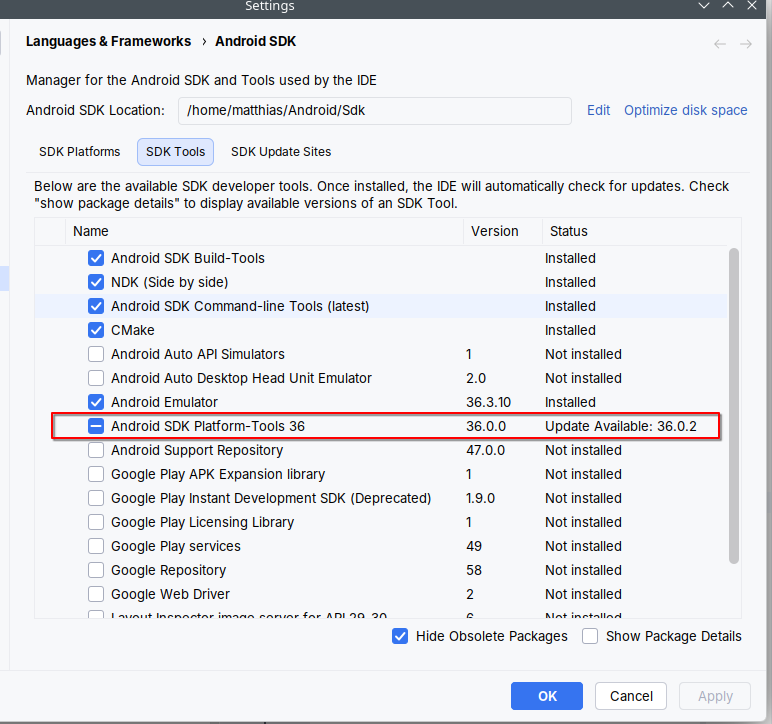
On my system the update mentioned is now listed “available” as i rolled back to 36.0.0:
Reproduction
- run
adb start-server - wait 1-5min
- system will freeze completely as described in this post
I also tried to check the logs of adb:
env ADB_TRACE=all adb logcat
without success … no logmessages when the system freezes.
Fix
Assuming your Android-Sdk is in the default location: $HOME/Android/Sdk
- Download 36.0.0 Platform-Tools from https://dl.google.com/android/repository/platform-tools-latest-linux.zip (be careful, “latest” currently points to 36.0.0, which might not be the case in the future)
- Remove platform-tools folder from
$HOME/Android/Sdk/platform-tools - unzip downloaded platform:
unzip platform-tools-latest-linux.zip -d ~/Android/Sdk
This is my currently working installation of Android-Sdk:
❯ sdkmanager --list_installed
[=======================================] 100% Fetch remote repository...
Installed packages:
  Path                                                  | Version       | Description                                | Location
  -------                                               | -------       | -------                                    | -------
  build-tools;35.0.1                                    | 35.0.1        | Android SDK Build-Tools 35.0.1             | build-tools/35.0.1
  build-tools;36.1.0                                    | 36.1.0        | Android SDK Build-Tools 36.1               | build-tools/36.1.0
  cmake;4.1.2                                           | 4.1.2         | CMake 4.1.2                                | cmake/4.1.2
  cmdline-tools;latest                                  | 19.0          | Android SDK Command-line Tools (latest)    | cmdline-tools/latest
  emulator                                              | 36.3.10       | Android Emulator                           | emulator
  ndk;28.2.13676358                                     | 28.2.13676358 | NDK (Side by side) 28.2.13676358           | ndk/28.2.13676358
  ndk;29.0.14206865                                     | 29.0.14206865 | NDK (Side by side) 29.0.14206865           | ndk/29.0.14206865
  platform-tools                                        | 36.0.0        | Android SDK Platform-Tools 36              | platform-tools
  platforms;android-35                                  | 2             | Android SDK Platform 35                    | platforms/android-35
  platforms;android-35-ext15                            | 1             | Android SDK Platform 35-ext15              | platforms/android-35-ext15
  platforms;android-36.1                                | 1             | Android SDK Platform 36.1                  | platforms/android-36.1
  sources;android-35                                    | 1             | Sources for Android 35                     | sources/android-35
  sources;android-36.1                                  | 1             | Sources for Android 36.1                   | sources/android-36.1
  system-images;android-35;google_apis;x86_64           | 9             | Google APIs Intel x86_64 Atom System Image | system-images/android-35/google_apis/x86_64
  system-images;android-35;google_apis_playstore;x86_64 | 9             | Google Play Intel x86_64 Atom System Image | system-images/android-35/google_apis_playstore/x86_64
@h8leet please let me know if this also fixes the problem on your side