I use KDE Plasma, and after updating to the latest version of opensuse, all my windows are partially transparent, and there is a strange grey box in the center of my screen. I’ve set my desktop background to a pure white which partially handles the issue, but it is not very tenable. I do not to my knowledge have any sort of transparency enabled. Here is a screenshot, since I’m not fully sure how to describe the error, and inxi -Gsaz. Thank you.
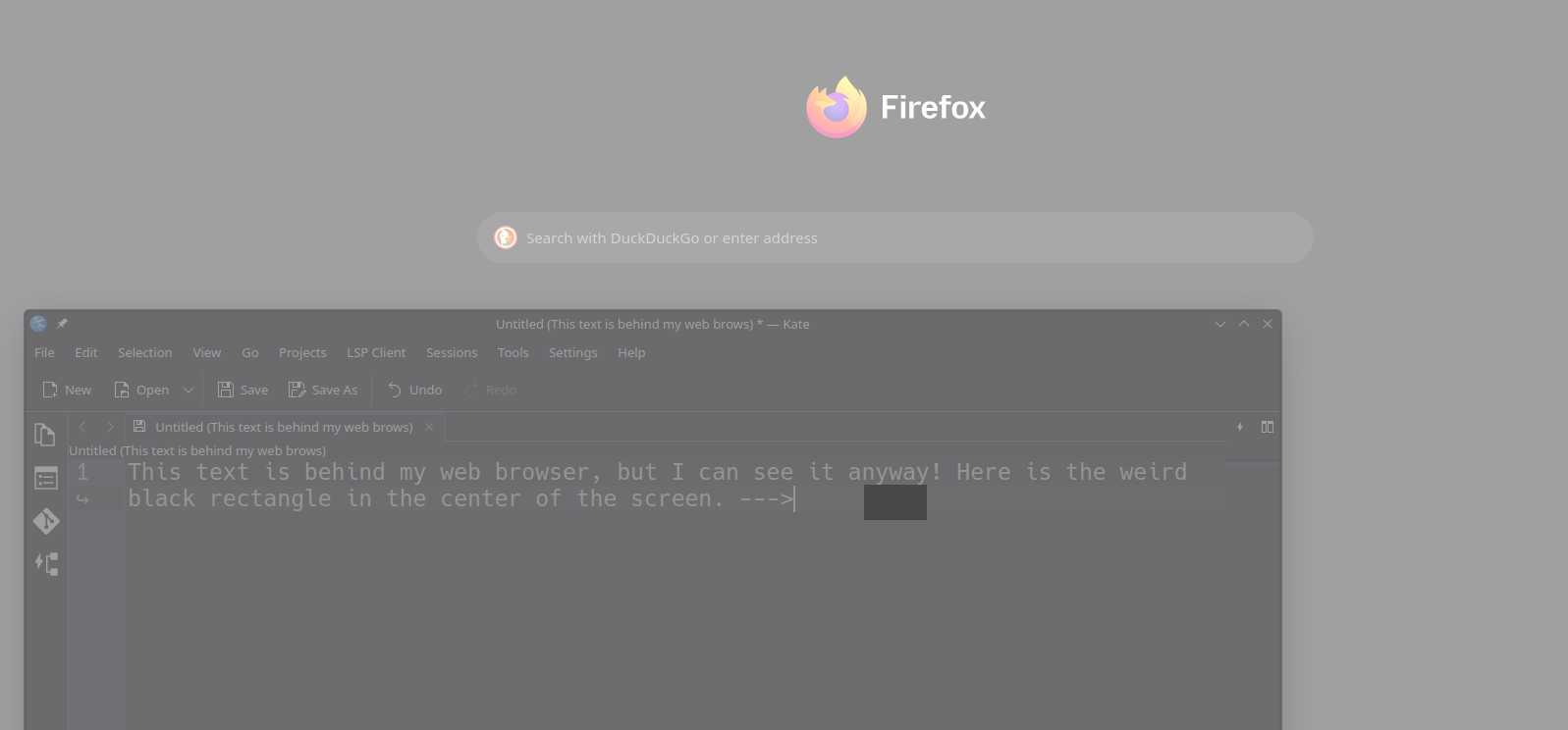
System:
  Kernel: 7.3.0-1-default arch: x86_64 bits: 64 compiler: gcc v: 16.2.1
    clocksource: hpet avail: acpi_pm
    parameters: BOOT_IMAGE=/boot/vmlinuz-7.3.0-1-default
    root=UUID=e6f23418-8743-4279-a2b9-74c7cbc01a6f splash=silent
    mitigations=auto quiet security=apparmor
  Desktop: KDE Plasma v: 6.8.1 tk: Qt v: N/A info: frameworks v: 6.31.0
    wm: kwin_wayland tools: avail: xscreensaver vt: 1 dm: SDDM Distro: openSUSE
    Tumbleweed 20261026
Graphics:
  Device-1: Advanced Micro Devices [AMD/ATI] Navi 23 [Radeon RX 6600/6600
    XT/6600M] vendor: Gigabyte driver: amdgpu v: kernel arch: RDNA-2
    code: Navi-2x process: TSMC n7 (7nm) built: 2020-22 pcie: gen: 4
    speed: 16 GT/s lanes: 16 ports: active: HDMI-A-1 empty: DP-1, DP-2,
    HDMI-A-2, Writeback-1 bus-ID: 12:00.0 chip-ID: 1002:73ff class-ID: 0300
  Display: wayland server: X.org v: 1.21.1.25 with: Xwayland v: 24.1.14
    compositor: kwin_wayland driver: X: loaded: amdgpu
    unloaded: modesetting,vesa alternate: fbdev dri: radeonsi gpu: amdgpu
    display-ID: 1
  Monitor-1: HDMI-A-1 model: Philips PHL 275V8 serial: <filter> built: 2024
    res: mode: 2560x1440 hz: 75 scale: 100% (1) dpi: 109 gamma: 1.2
    size: 597x336mm (23.5x13.23") diag: 685mm (27") ratio: 16:9 modes:
    max: 2560x1440 min: 720x400
  API: EGL v: 1.5 hw: drv: amd radeonsi platforms: device: 0 drv: radeonsi
    device: 1 drv: swrast gbm: drv: radeonsi surfaceless: drv: radeonsi wayland:
    drv: radeonsi x11: drv: radeonsi
  API: OpenGL v: 4.6 vendor: amd mesa v: 26.2.5 glx-v: 1.4
    direct-render: yes renderer: AMD Radeon RX 6600 (radeonsi navi23 ACO DRM
    3.64 7.3.0-1-default) device-ID: 1002:73ff memory: 7.81 GiB unified: no
  API: Vulkan v: 1.4.363 layers: 5 device: 0 type: discrete-gpu name: AMD
    Radeon RX 6600 (RADV NAVI23) driver: mesa radv v: 26.2.5
    device-ID: 1002:73ff surfaces: N/A device: 1 type: cpu name: llvmpipe
    (LLVM 23.1.3 256 bits) driver: mesa llvmpipe v: 26.2.5 (LLVM 23.1.3)
    device-ID: 10005:0000 surfaces: N/A
  Info: Tools: api: clinfo, eglinfo, glxinfo, vulkaninfo
    de: kscreen-console,kscreen-doctor wl: wayland-info
    x11: xdpyinfo, xprop, xrandr
