Agama installation experience

The forum software ate my first attempt of this answer :frowning_face: next try.

Many aspects of Leap 16.0 and its underlying SLFO (ex-ALP) platform are quite controversial.

The initial idea behind ALP (later SLFO) was an absolutely minimalistic skeleton Linux system to only run workloads (Docker / Podman containers) and nothing else; quite a radical departure from a traditional Linux with multiple users and local software that you could use, graphical desktop environments like KDE Plasma, GNOME, Xfce, and local services to interact with other machine in your LAN and the Internet.

After long discussions with business customers and partners it was decided that this was too radical for what they need and prefer, so it became less and less drastic and radical; closer to a traditional SLES (think SLE-15) than a world-changing ALP.

But still, for Leap that means that many things are quite a departure from previous concepts.

to be continued before the forum software kills it again

@shundhammer

No “disrespect” intended, but perhaps you weren’t following along on my original thread, where I was reporting on “glitchy mouse” and other problems that I was having in my already installed Leap 16 distro?? I wasn’t a first timer, trying to learn about how wonderful 16 is and all of the good things I should know about how to install it. I’ve been running a Leap partition for quite some time . . . .

And the advice given on my problem thread was to just add more stuff into that install, rather than, “let’s figure out what the exact problem is” . . . so given that I could keep adding more parts into a problem install, OR I opted to run a fresh install . . . . And I clicked in to the new Agama installer and found issues with it such that I wanted to “abort” out of it, and in fact there was no “reboot” option that I found . . . .

So, frustration already adding onto the problems that seemed to be exclusively happening to my 16 install, that I had previously in June had tried the new Agama installer and the function was also problematic . . . and again finding it to be “non-intuitive.” I went back to an old 15.6 installer and ran through that process, also without reading the guide, and it was more clear in functioninig and only a few issues to report, including the no way to untick “install bootloader” as a problem.

And then I used “migration tool” to move from 15.6 to 16 installing 2466 packages . . . so far the install has not really replicated the problems that seemed to get worse as I was interacting on my thread. Hmm, looks like I spoke too soon . . . in the previous sentence the words stopped typing and when I tried to go back and re-type them, nope . . . . So, seems like my “glitchy” mouse/typing problem is starting to grow in the new install.

Well, as reported here . . . there was no apparent way to “reboot” out of the Agama installer . . . whereas on the old installer I found the “abort” button to “be a comfort,” to know that if I felt something wasn’t stacking up the way I wanted it in the install, I could indeed, “punch out” of it . . . .

[part 2]

But in addition to the changes of the SLFO platform base, as a “.0” version this was one of the few chances to implement other radical changes; we couldn’t do most of those during the lifetime of a major SLES release. What is released with SLE-15 will need to remain for all the service packs (SLE-15 SP1, -SP2, …, -SP7) until they run out of maintenance (regular as well as LTS).

For example, exchanging YaST2 for something new could only happen now with the new SLES-16.0, or in 10 or 12 years with a SLES-17.0. And the Leap versions run in parallel with those.

Replacing YaST2 has been overdue for a long time. The first version was released with SuSE Linux 6.4 back in late 1999 / early 2000. That’s 26 years ago; aeons in the software world. We have been refactoring parts all the time, but there is a limit what you can do with mere refactoring.

Technologies have changed, people have changed; or rather exchanged. I am the last one in the team who was part of that initial YaST2 release back in 1999/2000.

Many tasks that were once needed to be done in YaST have now moved to the desktops (printer, language, localization, desktop resolution), others are now redundant because they auto-configure themselves (X11, Wayland, sound), others are completely obsolete.

What remains is primarily the installer, and people have been clamoring for something web-based since forever. The young kids love web programming, and they learned it in unversity. So a web installer it was, initially started as a SUSE Hack Week project. And Agama was born.

Yes, many aspects are new. It’s evolving. The team as a whole has the know-how about the Linux installer in general, what works and what doesn’t, what old stuff to throw overboard.

The users have to learn those new concepts. Sometimes prior knowledge of how YaST worked is a real obstacle; we found that often enough new users have no problems because they don’t need to unlearn things that YaST did differently.

Some parts like the storage setup has already been refactored after users were too often confused. Some other parts will probably still need refactoring. It’s all work in progress.

So, if there are major frustrations, please don’t stop speaking up, so the project can keep evolving.

System administration after the base installation is a major pain point. Cockpit can do some things; for other things it can be limiting.

Case in point: Package management. That’s why I chose to rip out that part of YaST to create Myrlyn; it has always been kind of a separate part for technical reasons (and I had written it in two iterations before anyway, before libzypp and once again when libzypp arrived).

Myrlyn is libyui-qt-pkg a.k.a. YQPkg plus some init code to load the repos, and the transaction commit phase where packages are actually downloaded and installed. And some dozen bug fixes because YQPkg had been kind of neglected for many years.

Other pain points include the bootloader configuration; our Cockpit team added that just recently. Maybe they’ll add some more things.

OK; enough for now. :smiley:

1 Like

By all means -Stefan… Old enough and Novell Netware. Database IBM Informix DB. Some are are wondering and installation of Enteprise on the serverside. Clients? Something s missing.
Regards

OK, the horse’s mouth speaking sagely on the history . . . my brief reply, “I ‘like’ YaSt . . . YaSt is my friend.” It might be interesting to compare if any packages of Debian extend back into the deep recesses of linux development . . . sometimes change is good, if not inevitable, and sometimes it’s the same thing repackaged in new veneer . . . . Function and ease of use should be first priority . . . for a range of new and old users.

I feel your pain.

My prediction is that in a number of aspects the powers that be will need to backpedal. But what aspects that will be is anybody’s guess.

When we started this transition and ALP was still the target we (the YaST team) asked the same questions, and the replies were along the lines of “the business customers and partners have their own custom workflows and configurations for those services anyway” or “this is all run in containers these days, and those are beyond our scope”. Or “they use separate tools like combustion and ignition anyway”.

That doesn’t help a small business owner very much, I fear. I expect new Open Source projects to sprout for exactly that target audience; containers for a simple LAMP stack with a reasonable default configuration, for example. I just hope this will happen before that target audience leaves for a different ecosystem.

LOL, my “pain is real” as many of the folks who come to see me in acu clinic say to me when discussing the impacts of emotional pain on the body . . . .

Obviously to design a system that will work for everyone could increase the level of difficulty exponentially, and I am largely an end user who boots into a different daily driver install for each day of the week.

On this new machine, built in May/June and then the 7 installs were run in close proximity time wise, the comparative experience was consecutive and “recent.” On the previous Mac base machine, drives were added over a number of years so installs were more spaced out.

I originally came to TW after a number of years of running the various ubuntu/mint/debian installs and grew “tired” of having to go through the next iteration upgrade every 6 months. I wanted “rolling” and TW was offering just that. That was a long time back and I recall you were a regular on the forums at that time. Also at that time TW was “rock solid,” even with the rolling, few “problems” would crop up in the care and feeding of it. But, then in the last number of years to now perhaps a decade, TW became more “high maintenance,” so I went to Leap for a comparative “stability” . . . but then there was the need to “jump up” and the process for that, etc. To me 16 is “Leap” . . . with good and bad aspects, but now hitting into this mouse/keyboard glitch problem . . . right now my opeSUSE installs take drastically more time and attention in the running of them compared to my other 6 distros, that’s just a “fact” of using them. I “like” the aspect of having “fresh horses” but the price for that is higher, higher than it was when I first got into TW . . . back in the late '00s or early “teens” . . . .

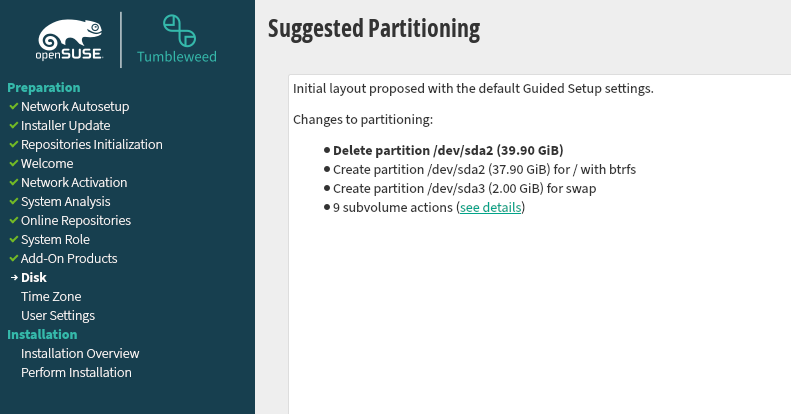
In the recent round of installs I think I regard the “calamares” installer as the “gold” standard, in that when I click “advaned” or “custom” it goes directly to a GParted window and it shows ALL of the partitions on the drive, and it is very clear which one is being selected or which unallocated space is being modified . . . very clear. And, from memory, I believe there is a box to check if “install bootloader” is required, if not checked it doesn’t install grub. As with everything in this world “good” and “bad” are intertwined, one downside to Calamares is I believe it uses MB for creating disks, rather than with the YaSt option using GB . . . which in the old days MB might have been enough, these days even /boot/efi apparently no longer can be a basic MB based disk, as more and more data is being slipped into it . . . . But, in comparison to Calamares installer, even ye olde YaSt based installer I used yesterday didn’t show me the “unallocated” space that I was “adding” to, I just had to remember what size it was from checking it in GParted awhile before I started the installation . . . .

1 Like

In the YaST partitioner, you can use GiB / MiB / kiB / Bytes in all places where you have to enter sizes; just overwrite the “GiB” part with the unit of your choice. And the same in Agama IIRC.

2 Likes

Completely not the case here. With just some basic instructions, my “customers” managed to use the Agama installer fine:

  • backup all /home/* to USB disk
  • perform install with defaults with pointer to the Software Selection
  • reboot when done, add “3” to kernel command line in GRUB
  • restore /home/*
  • reboot
  • login

[sarcasm]But yeah, that was how it was intended by the devs, who are they to decide what is best practice. [/sarcasm ).

It still is, but nothing will avoid PEBKAC issues. If people would treat their cars like some do their OS, I most likely would not dare to go out anymore.

Also, please consider this below, with all the people “comparing distros” and being very vocal and demanding about it, the devs feel forced to set rules just to protect them from continuous distraction and endless debates:
“The Silverblue Rule”. Any request or discussion that cites any other Linux distribution to support or justify that request will be deprioritised as a result. Any good idea should have reasons besides just following others.
( copied from the Aeon room in our Matrix ).

If I may chime in here. Believe it or not, I had read below the download page where it mentioned Agama. I clicked there, and it took me to github which talked about a new installer, about how to run and run it remotely. I had made a usb boot, so didn’t need to install a live Agama ISO.
I don’t know if I read the startup guide, but looking at it now, it says Publication Date: June 10, 2024 and shows YaSt. I never came across the guides that malcolmlewis showed. That may have been helpful starting out, to know what to expect. So what I’m saying is for someone wanting to install 16.0, who even looks at the information below the download, the guide does not appear readily available. Even now being aware of it. However, now when I click, full documentation, I do find the guide. But if the startup guide was not relevant, I would not click on the full documentation. I did click on the release notes, which then saw the Agama installer, already had been there, don’t need to see github again on how to install Agama.

So hope that gives at least my thought process and why I never found the guide. The first link about Agama on the download page probably through me off as not relevant.

Anyway, that’s my thoughts on the guide. It’s not front and center. Hidden basically. Most people want to install it, then maybe read the full documentation. So maybe there needs a separate line under Documentation such as, Using the Agama installer. Or even more direct, First timers using Agama Installer, be sure to read this first!

But I got it installed without the guide. It took me a few of attempts. Once I accepted I was not in YaST anymore, and thinking non-intuitively, I did manage to get it installed on my new partition along with all my old ones, exactly the way I wanted. It’s just different, not the same. But I think I can do it better now. I was quite surprised to find it ran in a Firefox browser. How weird! I would think some potential security issues. How can you install an operating system with a browser! Just really odd and unexpected. But hearing you say the young people want that, I guess I’m outdated.

But in one of my attempts where I was realizing it was going to take longer than I had and I was ready to shut down, I thought, what if I closed the browser, would I be at a command prompt or just an empty background? So I did. It restarted! I can’t remember if it started at where I left off or started over, but that may be the “abort” people were wanting.

1 Like

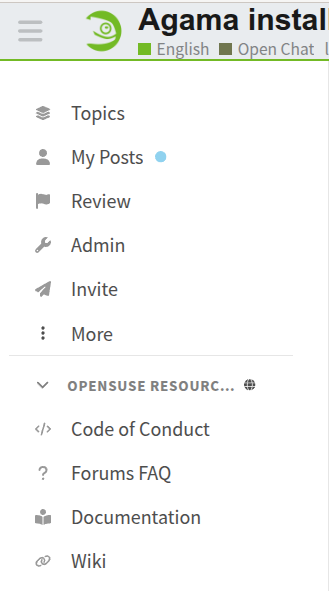
@dt30 If you expand the hamburger menu on the left of the Forum logo, there is a link “Documentation”

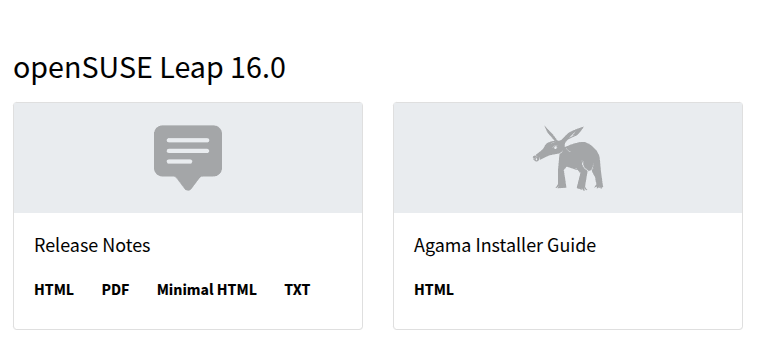
Follow that and there is a Agama Installer Guide

Which takes you to https://agama-project.github.io/docs/overview

@knurpht

So, you must be aware that I didn’t start this thread, it was cut off from the thread that I did start discussing “glitchy mouse” and typing problems . . . with Leap 16 . . . so basic function stuff which seemed to slowly build up from minor mis-types to more difficult problems with trying to regain typing function??? You posted on that thread, so you must be aware that “there is an issue” . . . no?

In my case I have a multi-boot machine, so each day I can use another system . . . I didn’t do that because I have an axe to grind with openSUSE . . . I just like “variety.” But, what it gives me is a regular comparison of function, capacity, amount of time that goes into maintaining the various systems . . . .

And, on a very basic fact level, I am repeating that more time and effort goes into my two openSUSE systems . . . even on my new “v2” machine. The problems that I was hitting on my old machine, involving nvidia graphics were not entirely left behind . . . even with a new build . . . stuff seems to be creeping in. And, in that other thread we didn’t really nail it down . . . we were just going to keep adding packages, in hopes that it would fix something . . . what, we don’t know . . . .

And. repeating again, it wasn’t like I desired to run a new install of Leap, it just seemed like the most expedient way to test a problem comparing Leap 16 to Leap 16 . . . but requiring TIME and effort to produce that condition. And then, finding out that in trying to investigate the problem I have insulted the devs for my failure to read the manual . . . for a basic function like installing a linux system . . . . So, hard to find win-win in it . . . .

If there is some glitch in the Leap software, which I am not finding this problem in my other installs, would not the devs want to know what that is?? OR, better to suppress the discussion on it???

Considering this forum doesn’t have a surplus of openSUSE developers that monitor it, and the long-standing and well-documented practice of bugzilla.opensuse.org being the place to file bugs, and notify developers of problems, then yes, in large part, the endless “documenting” of your problems here is rather pointless.

1 Like

Endless? But, OK, thanks for the reply on it, I live for futility’s sake.

At this point on my other thread we haven’t yet “figured out” what the problem might be, so what would the bug report be about and against what, etc??

And the actual developers may potentially be able to point you at where you should be troubleshooting, or have some idea what the problem is, if you file a bug report.

Oftentimes, when things are unclear, they will ask you to check things.

Or, you know, you do you, and keep poking around in the dark, until you’re satisfied that you can file the “Perfect Bug Report™”

1 Like

That is because you are structurally not providing the info asked for, haven’t done any stock, all default install, go off topic in long and confusing posts. This makes it very time-consuming to even deduct what the problems you experience are, let along help out finding a solution. Sorry to say so, but if you would file bugs like your posts here, I have strong doubts that any dev would accept such a bug report.

1 Like

s/along/alone

Would you guys make up your mind(s)?? I should quit gassing and file bug report against who knows what package?? OR, it doesn’t matter what I do, no dev will accept my bug report??

Sorry, sir, you “know me” enough to say “you do you, stumble around in the dark waiting for perfect bug report?” Historically if a thread is posted and it is determined to “be a bug” by the admin guys, then I file a bug report on it. So far I haven’t had the time to spend on it to drill down on what might possibly be causing the issue, to then get the time to file a bug report. This thread was started by Deano to be a discussion on the Agama experience, which I have endlessly gone on about . . . “doing me” . . . .

I have no idea what you are talking about, the Leap install was “stock” anything that was requested I did, OTHER than adding yet more complication to an install by adding Wayland to it, etc. I created the new install, bone stock to now “test” stuff, but also haven’t gotten to trying stuff out . . . to even start to think about whether a bug report should be filed.

Frankly, your posts, once again are largely “not helpful.”

Yet again another “not helpful” nonsense post. When you made some such post 6 8 months back with some snark involved, when I snarked back, you gus banned me from the forum . . . thus reducing any “discussion” on the care and feeding of your products . . . .

But, when I get a moment to get back over to the typing/muse thread and check through the suggestions, when I get something that might be an indication of a problem or a question about the requests, I’ll post back over there . . . .

Chill, man. Knurpht was correcting an error in his earlier post. He wrote “[…] let along help out finding a solution […]” and meant to write “let alone”. The string s/along/alone is a common Linux CLI editor command to do a search and replace.

2 Likes

Hi.


Yes, as always.

YaST never did that, Calamares installer did it.

Yes, I loved that, but I wouldn’t say that’s suitable for beginners.

There are a lot of things that the YaST partitioner allowed you to do during installation that Agama can’t. Many of them are in the roadmap, and not a single one is “for beginners.”

Well, the entire point is this:

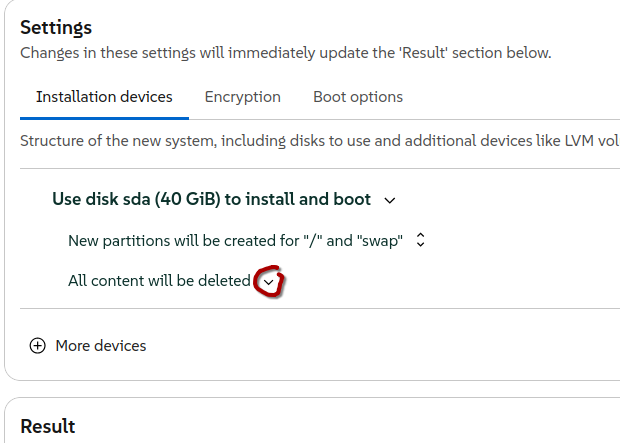
So question is, “Is this type of interface the clearest?”

It’s obvious that major developers, including Microsoft and Apple, favor this type of interface, whether for aesthetic reasons, functionality, or simply because it’s trendy. So, the question is, for the majority of people who don’t use openSUSE, is this interface clearer than the one we used in YaST? You know, buttons, links, and all that.

All you have to do is click on a drop-down menu to change the option selected in that drop-down menu.

Of course, Agama’s interface has already changed since the release of Leap, and it will continue to change as long as the developers believe they can improve it. I’d say that’s also on the roadmap.

One thing more:

Having two or more operating systems isn’t trivial; there’s a lot to understand. I mentioned Calamaris earlier, but many people install Mint (for example, but also some openSUSE systems and others) and then find that one bootloader doesn’t recognize the other system. These kinds of installations, when done by inexperienced people, require some kind of support. There are dozens of tutorials. I’ve even written a short text (in Spanish) about it myself. There’s not much more to it than that.

1 Like