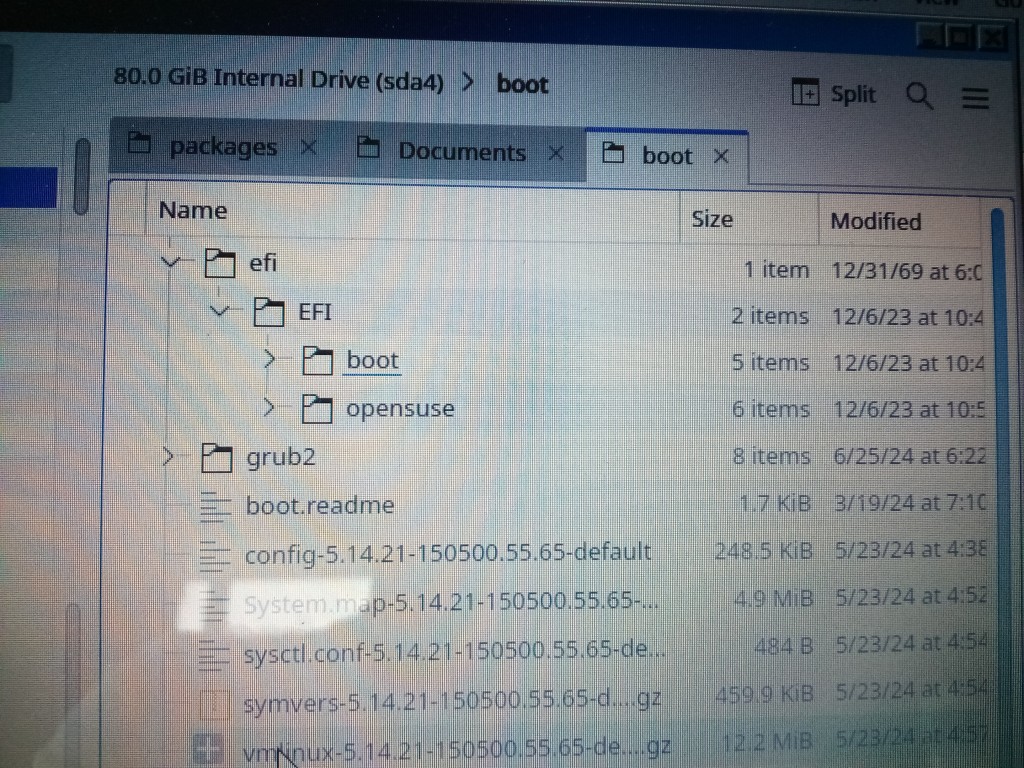
There is no /boot/efi/EFI/boot on any of mine. Mine are all /boot/efi/EFI/BOOT.
If you mean a directory in /boot/efi/EFI/, of course. In most cases, each is just a directory with one or more files. Root user can simply delete it. Binary files that the UEFI BIOS can run directly can be there too, such as mt83x64.efi, which is memtest86 v8.3.
It contains whatever binary code is required by the UEFI BIOS to launch a bootloader menu, such as grub2.
If by example you mean post #31, the choice is the first choice in the UEFI BIOS priority menu by default. To choose another, either change the UEFI BIOS priority list, or use the BBS menu.
In an overall sort of way, you have the right idea. However, Grub menus I’ve used have never had as few as one entry.
Almost. Bios Boot Specification, provided by BIOS since before UEFI existed. Hotkeys to interrupt normal boot to select a different device to boot from:
Abit * F9
Acer * F12 or ESC or F9
ASRock * F11
Asus * F8
Biostar * F9
Dell * F12
DFI * ESC
eCS * F12 or F10
eMachines * F10
EVGA * F7
Gateway * F12 or F10
Gigabyte * F12
HP/Compaq * F9 or ESC or ESC,F9
Intel * F10
Lenovo * F12 or F8 or F10
MSI * F11
Shuttle * ESC or F11 or F7
Toshiba * F12
The ESP is the UEFI host for whatever code any bootloader needs to function, or binaries such as memtest86. The code in /EFI/opensuse/ starts Grub. At least, bootloader startup code was the original intent. Some distros are putting kernels and initrds there as well, something I wouldn’t trust to any VFAT filesystem, such as is required by the UEFI specifications.
Not data. The only sda removal I meant was just surplus out of support OS installations, unless adequate freespace remains for additional - of type primary, if you wish to try migrating or cloning from your NVME’s 15.5.
Don’t get the idea that Grub is all there is in FOSS UEFI bootloaders. There’s a new kid on the block called systemd-boot, available in TW, and the default in some distros, such as Fedora. Some people get by using only rEFInd, which has been around quite a while. This doesn’t mean you need to get distracted by them any time soon, if ever. Grub will remain viable for quite some time.
So the BIOS on my motherboard knows about a specific folder directory and file on my hard disk and can boot from it? I suspected as much when I had first read about UEFI, but to me that is just so weird and strange. But then, when I first booted up into my new BIOS, I just sat there dumbfounded and laughing that it was able to use a mouse and had graphics with spinning fans! Just so different.
I know in the past, you could go into BIOS, set which hard drive you want to boot first, then save it, reboot, and it would load from the MBR and go from there. I had a flash drive I used to set up the laptop, so I changed my desktop BIOS to CSM disabled, rebooted it with the flash drive in, and it was like in the BIOS, but yet had a menu choice of which to boot from. Amazing. It also said F8 for a boot menu. And there were additional items that didn’t exist before the flash drive was in. Such as rearranging boot order, etc.
I tried the installation of 15.6 up to the drive setup, and with CSM disabled, it gave a choice of keeping the 15.6 and other partitions or I could remove it even if not needed. Either way, it gave an ESP, named EFI, partition. So I feel confident it will do it right with CSM disabled. If I leave the old ones, it puts the new ones further down the list. So probably good to just redo the whole drive, right?
To add to my confusion was the messages in my BIOS about CSM.
It says things like (if I can retype it correctly),
CSM(compatibility support module)
[Enabled]: For a better compatibility, enable the CSM to full support the non-UEFI driver add-on devices or the Windows UEFI mode.
[Disabled: Disable the CSM to fully support the non-UEFI driver add-on devices or the Windows UEFI mode
Due to Microsoft Secure Boot regulations, ensure the Microsoft signed UEFI driver is contained in the plugged PCI-E based storages including M.2 SSD before set the Launch CSM to [Disabled]. Otherwise, the PCI-E based storages will be only available for the data drive usage.
Not sure what that means, but made me think it was a microsoft thing that I didn’t need to worry about.
Is “secure boot” important? Maybe that’s what I mangled the purpose with UEFI regarding microsoft?
So yes, it has enough room. And it is a GPT drive with the MBR compatibility. By clone, what do you mean? Would you use rsync or something else?
I’m thinking rsync to my sda 15.5 with exclude of /etc/fstab and /boot/grub2
I looked at the link and looks like it could be nice. But, yeah, I have enough to update my mind on before worrying about that. Seems to me there should be a simple way to create a menu boot partition that has all your menu items. With graphical software to allow you to easily rearrange and rename and re-point the items to whichever partition and file. And editable within each operating system. The BIOS would just pass control to this boot menu partition and let it take it from there.
You’re using a deviant file manager. I show output from system commands in terminal:
# tree /boot/efi
/boot/efi
└── EFI
    ├── BOOT
    │   ├── BOOTX64.EFI
    │   ├── fbx64.efi
    │   ├── grubx64.efi
    │   └── mt83x64.efi
    └── opensusetw
        └── grubx64.efi
# ls -Ggl /boot/efi/EFI/
total 12
drwxr-xr-x 2 4096 Jan 31  2020 BOOT
drwxr-xr-x 2 4096 Jun 21  2018 opensusetw
drwxr-xr-x 2 4096 Mar 24 01:47 .opensusetw202403
It just got smarter, from reading only a disk’s first sector, to reading a file from a filesystem.
You lost me.
Cloning makes a clone. Every bit is identical, including hidden file attributes, UUIDs and LABELs. That rsync cannot do, but it may not necessarily be what is wanted either.
The key portion of my Grub’s boot menu, where the selections I most often use live, I manage with a text editor. Text editors are simple, or at least, can be. Those I use are simple enough. Those most used selections live here in /boot/grub2/custom.cfg on UEFI PCs. Grub2 incorporates this file into its own grub.cfg for presentation as a menu when POST has completed. My stanzas are simpler and shorter than those found in grub.cfg. They normally need editing only when an OS is added or removed from the system.
What it does now is pretty much that. It locates the ESP filesystem, locates the file saved in NVRAM, and loads it. Its job is then done. From there, it’s up to the file just loaded what comes next.
I was trying to say I did a trial run with the BIOS changed and it looks like it’s going to work.
I need to understand what you mean here.
One partition for the ESP.
One for 15.6.
One each for any other OS.
?
Cavsfan talks of /etc/grub.d/06_custom but doesn’t say if it’s in a separate partition from the main OS or part of it.
Is what you’re saying having something like a menu partition which only has grub in for all the OSs on the drive?
Can it be a partition that only has /boot/grub2 in it?
root is set so then that partition should load without any operating system being in that “menu partition”?
If that’s not what you mean, is it possible?
Then, whenever one installs a new operating system, don’t have it installed in the NVRAM. This would leave your menu partition alone, and you would manually add the entry.
That way the the BIOS always loads the same ESP entry and the ESP entry always loads the dedicated “menu partition”. Not sure how to initially set the ESP for it…
I’m not sure what you’re asking, but I thing the answer is yes. I have at most one ESP per disk, which usually translates to one ESP per PC; and one / partition per installed OS.
/etc/grub.d/ contains the configuration files used for regenerating /boot/grub2/grub.cfg each time. Each installed OS that has Grub2 installed has that directory. 06_custom is not an OEM file. On mine, it is a copy of the OEM 40_custom file. It’s existence is responsible for custom stanzas appearing in the Grub boot menu above the auto-generated stanzas.
It is what I normally do on legacy/BIOS/MBR PCs. UEFI works differently, so no, I do not…
…but it could be a working configuration, and extra complication I haven’t found need for.
Conceptually I think yes, but I don’t think I really understand your question.
As long as there’s only one ESP, and one entry on it, and in the BIOS, that’s how it will stay. It’s essentially what I do in legacy/BIOS/MBR, as Grub makes it easy. Grub2 is more complicated, so I mostly let it do its own thing. What I do is an add-on to it, configured to show my entries first, so its obvious workings stays out of my way.
The ESP is essentially an interface to the BIOS. Each directory on the ESP in /EFI/ is a potential default for the BIOS to load a particular bootloader on each boot. If you want to switch the default, you either go into UEFI BIOS setup, or you employ efibootmgr. If you simply want to boot using an alternative bootloader, the BBS hotkey is at your service, so that a different directory in /EFI/ will be loaded instead of the usual. Key here is making sure each installed Grub2 has a unique directory in /EFI/. That’s what GRUB_DISTRIBUTOR= in /etc/default/grub is for.
All my custom UEFI Grub2 stanzas live in /boot/grub2/custom.cfg on my TW / filesystem, by way of TW’s /etc/grub.d/07_custom. They could as well live directly in TW’s /etc/grub.d/06_custom. Or they could be directly in /etc/grub.d/41_custom, but then they would appear all the way down at the bottom of Grub2’s boot menu.
If I’m understanding correctly, I’m thinking your Tumbleweed creates the stable environment area that I’m trying to suggest. But someone else could mess up their Tumbleweed and loose their menus.
Using diagrams, here’s what I was trying to say for my idea:
The grubx64.efi would be set to point to mymenu partition /boot or /boot/grub2. This is what I’m not sure how to do, but it must be possible somehow. Maybe efibootmgr can do that, but I think it only selects choices from the EFI directory. But something creates it, therefore, there should be a way to create it to point to mymenu.
grubx64.efi would not be changed, by selecting not to install in NVRAM in new installs. Then you would manually add the new install to the mymenu partition /boot/grub2/grub.cfg.
Nothing else would be on this partition.
The menu entries would be in grub.cfg or custom.cfg which would only be updated manually.
Custom.cfg probably would not work unless grub2-mkconfig -o can do it.
nvme0n1p4 openSUSE 15.5 nvme0n1pN openSUSE N …
would each have their typical /boot/ and /boot/grub2
I’m still not clear on the purpose of UEFI, and I get the feeling my suggestion might be defeating its purpose. But to me, while the concept may have an initial extra complication in it, the continued maintenance is less complicated in my mind. Nothing changes in the BIOS. Nothing changes in /EFI. One only has to manually add the entries to /boot/grub2/ on the mymenu partition. And there could be a script to do that. Maybe grub2-mkconfig -o would work for that.
Could this work, does it make sense, what kind of issues might I have, why would it not be a good plan?
My new installs don’t write to NVRAM either, but my new stanzas are still going to go in the custom.cfg file on whichever filesystem has the grub.cfg that includes it, and is pointed to as top priority in NVRAM.
I still don’t comprehend your need for a separate filesystem for no more than boot stanzas.
Still don’t follow.
That’s how it works on the ESP.
It’s what I think you are doing.
You’re describing what happens here, except without a surplus filesystem.
The most I can suggest is why it might not be good is your extra layer of complication - the surplus filesystem. It seems like you don’t like the idea of a custom.cfg in the /boot/grub2/ of the installation you want to be in boot control. You don’t have to have one anywhere. You could use /etc/grub.d/40_custom on the preferred boot control installation.
The ESP can be used for more than just /EFI/. It’s your computer. If you wish to store random stuff there, the only stopper I can think of might be freespace adequacy. Just remember, it’s a VFAT filesystem, with all the disadvantages VFAT customarily provides.
Because it gets overwritten every time I install a new system. For example, I have 15.3, 15.4, 15.5. Then rotate them around. If I should have something special/different in my 15.5/etc/grub.d/40_custom or 06_custom, then install 15.6 over top of the 15.3 partition, I no longer have the entries in _custom. Because my default boot is now in another partition. I guess I can copy over 40_custom and that might be a whole lot easier than what I’m suggesting. But what if I do something and redo 15.6. It’s almost like I need to have a copy on my data partition. Which might be what you and Cavsfan implied one would do and I missed it. I suppose it would be just as easy to copy over each time than what I was suggesting. Just needed help thinking through that…
Okay. I guess you got me worried about the ESP overwriting, needing a GRUB_DISTRIBUTOR, and I was trying to prevent it. But in reality, in the past, my MBR is being rewritten each time, too, and I’m dealing with it. So shouldn’t be a difference. Guess I’ll go with the default, making sure it chooses maybe a 260MB for the ESP.
I have copied everything over to my sda drive. Made mistakes and got confused which direction I was going and changed the wrong fstab. I got booted up in sda, checked lsblk -f and saw the mistake, changed it correctly, rebooted, and everything appears okay. Just shows how easy to mess up even when you are trying to be careful.
In the process, I was trying out the BBS hotkey and see that I can choose to boot either drive. When I was playing with the laptops, I had seen a boot screen and thought it was remnants of windows recovery. But there is no windows at all on the laptop nor desktop so know that’s not it. This is something different than the old past. The laptop BBS even allows you to go through and select which .efi you wish to boot. Amazing!
Not when using UEFI, and employing a unique GRUB_DISTRIBUTOR= value in the original installation. The only Grub configuration overwriting that may occur is to the directory that it defines, located in /boot/efi/EFI/. The first one makes an opensuse directory there. Upon changing GRUB_DISTRIBUTOR= and applying the change, /boot/efi/EFI/opensuse becomes obsolete. Possibly using YaST to do the work, on application of the new, the old might be removed. Regardless, the second installation will use /boot/efi/EFI/opensuse, whether a stale entry remains there or not. If you deselect writing to NVRAM, the new installation’s Grub won’t even change the default bootloader, writing only to the installation target / filesystem, or to a separate filesystem mounted to /boot/ if applicable.
It also will not happen if you do not include Grub in your new installation. It isn’t necessary when you already have a bootloader that works. When your original installation’s grub.cfg is next regenerated, with previously having set its own /etc/default/grub’s GRUB_DISABLE_OS_PROBER=“false”, it will contain entries for your second installation. Only one bootloader per PC is one reason why “not managed” is a bootloader option during installation.
Yet another way to prevent overwriting with UEFI is to simply not include the ESP filesystem in the new installation’s fstab. The installer may complain, but it doesn’t matter if you already have a working bootloader.
IMO, the UEFI designers did a very good job providing multiboot support.
Maybe I don’t understand what that means. I was using Grub and MBR with multiple installations of openSUSE. So, in my case anyway, is there is only one “bootloader” installed within the MBR?
But doesn’t the bootloader (does that mean /boot/efi/EFI/opensuse/grubx64.efi?) point to /boot/grub2/grub.cfg of one installation? And how do you not include Grub in an installation?
Would that mean if I have 15.5 and then install 15.6, without writing to NVRAM, then the /boot/efi/EFI/opensuse/grubx64.efi will still be pointing to the 15.5 /boot/grub2/grub.cfg instead of the 15.6’s?
The NVRAM entry does not point to “grub.cfg”. It just points to “shim.efi” (or perhaps “grubx64.efi”). It is other files in “/boot/efi/EFI/opensuse” that point to the “grub.cfg” and those other files are still updated even when you tell it to not update NVRAM.
Only one can fit. Only one is supported by a BIOS. Last installed or updated wins.
Unless GRUB_DISTRIBUTOR= points elsewhere, yes.
First, choose “not managed” for bootloader. Then, deselect the selected grub2* packages, if any, during detailed package selection. For added insurance, taboo instead of mere deselect.
Yes, unless you did as suggested with GRUB_DISTRIBUTOR= in 15.5. If you didn’t, then when you’re ready to switch control from 15.5 to 15.6, alter 15.5’s configuration appropriately so that it will not write to NVRAM or the ESP; then the opposite with 15.6.
I got it installed and looks like it did it okay. The install process offered 512MB for the ESP, and I just went with it. It also chose the swap partition on the sda drive. I couldn’t figure out how to make it not, then I remembered you said disconnect the drive. I did (after shutting down) and it then put it at the end of the nmve drive. I thought I had read somewhere in the past that swap partitions should be at the beginning?
It then chose to give the rest of the drive for /. I couldn’t figure out how in install process to resize that along with the swap size. I ended up deleting the / and then adding it back in along with a couple of additional empty partitions.
All in all, I was more afraid of doing it than what the actual process ended up being. I’m not sure how one would do it if they didn’t have a flash boot drive in uefi or DVD, but maybe that would be the only way of installing other than adding a grub entry. I think that’s what happened last time I tried with 15.5 on the nvme and was not in the uefi boot mode. So it just used grub.
Interesting thing is, my 15.3 partition booted! Seems strange that anything changed allowing that. Comparing the grub.cfg of 15.5 and nmve, the entry looks the same to me. Odd thing was the screen resolution was 1024x768 with no different options available. I forgot what I was looking for on it, but looked through the menus and didn’t see anything that jogged my memory. Must have been prior to that.
But my 15.5 on sda did not boot. My own doing, as I was playing around with the Yast boot loader and choosing grub2 for efi. Since I was going to format the nmve drive anyway, I saw that as a chance for learning if there was a way to put that partition on the nmve drive and boot from it. It didn’t work, probably didn’t have something right, who knows. It had automatically mounted it.
The boot process of 15.5 just kind of hung. I found out if by waiting a very long time, there was a long list of dracut_initqueue timeout messages. At the very end, it said it couldn’t mount the uuid of which was my attempt at creating the efi partition previously.
But before I had installed my 15.6, I either unmounted it and the system or I commented it out in fstab with a “#” at the beginning. There was a kernel update during that time, which most likely happened while it was mounted. I saw the process and at the end it was running a script for a very long time. Like normal kernel updates. After some time trying to figure out how to boot to the 15.5, I thought about the advanced options and choosing the older kernel. It worked!
So am I thinking correctly that not only does grub.cfg and fstab have uuids that need to be changed, but if there is a kernel update, something is embedded in the files found in the boot directory such as initrd-5.14.21-150500.55.73-default and/or vmlinux-5.14.21-150500.55.73-default.gz? And now, how do I fix them? Probably easier since I can boot into it by choosing the older kernel.
The reason was with rotating rust platters, outer tracks have a higher spin velocity. That has no applicability with SSDs.
When 1024x768 happens, check /var/log/Xorg.0.log. If it’s there, or in ~/.local/share/xorg/, likely you’ll find more than one or two (EE) lines that can constitute clues to a problem. Commonly nomodeset, or an equivalent, was included on the kernel cmdline. It will also happen when a required graphics driver is absent or broken.
There is nothing you can do with or about vmlinu*, and same with initrd*, other than regeneration and if necessary dracut reconfiguration.
Device UUIDs must be kept unique. There is nothing I’m aware of in kernels which is designed to handle such misconfiguration. Any copying that includes UUIDs requires subsequent re-uniquing if to be allowed in the same system as the original along with it, and corresponding edits to anything dependent on them.
[   531.730] (II) modesetting: Driver for Modesetting Kernel Drivers: kms
[   531.730] (II) FBDEV: driver for framebuffer: fbdev
[   531.730] (II) VESA: driver for VESA chipsets: vesa
[   531.732] (EE) open /dev/dri/card0: No such file or directory
[   531.732] (WW) Falling back to old probe method for modesetting
[   531.732] (EE) open /dev/dri/card0: No such file or directory
[   531.732] (II) Loading sub module "fbdevhw"
[   531.732] (II) LoadModule: "fbdevhw"
[   531.732] (II) Loading /usr/lib64/xorg/modules/libfbdevhw.so
[   531.732] (II) Module fbdevhw: vendor="X.Org Foundation"
[   531.732] 	compiled for 1.20.3, module version = 0.0.2
[   531.732] 	ABI class: X.Org Video Driver, version 24.0
[   531.732] (EE) Unable to find a valid framebuffer device
[   531.732] (WW) Falling back to old probe method for fbdev
[   531.732] (II) Loading sub module "fbdevhw"
[   531.732] (II) LoadModule: "fbdevhw"
[   531.732] (II) Loading /usr/lib64/xorg/modules/libfbdevhw.so
[   531.732] (II) Module fbdevhw: vendor="X.Org Foundation"
[   531.732] 	compiled for 1.20.3, module version = 0.0.2
[   531.732] 	ABI class: X.Org Video Driver, version 24.0
[   531.732] (II) FBDEV(2): using default device
[   531.732] (EE) Screen 0 deleted because of no matching config section.
[   531.732] (II) UnloadModule: "modesetting"
[   531.732] (EE) Screen 0 deleted because of no matching config section.
[   531.732] (II) UnloadModule: "fbdev"
[   531.732] (II) UnloadSubModule: "fbdevhw"
[   531.732] (II) FBDEV(0): Creating default Display subsection in Screen section
	"Default Screen Section" for depth/fbbpp 24/32
[   531.732] (==) FBDEV(0): Depth 24, (==) framebuffer bpp 32
[   531.732] (==) FBDEV(0): RGB weight 888
[   531.732] (==) FBDEV(0): Default visual is TrueColor
[   531.732] (==) FBDEV(0): Using gamma correction (1.0, 1.0, 1.0)
[   531.732] (II) FBDEV(0): hardware: EFI VGA (video memory: 3072kB)
[   531.732] (DB) xf86MergeOutputClassOptions unsupported bus type 0
[   531.732] (II) FBDEV(0): checking modes against framebuffer device...
[   531.732] (II) FBDEV(0): checking modes against monitor...
[   531.732] (II) FBDEV(0): Virtual size is 1024x768 (pitch 1024)
[   531.732] (**) FBDEV(0):  Built-in mode "current": 78.7 MHz, 59.9 kHz, 75.7 Hz
[   531.732] (II) FBDEV(0): Modeline "current"x0.0   78.65  1024 1056 1184 1312  768 772 776 792 -hsync -vsync -csync (59.9 kHz b)
And additional in .local/share/xorg/:
[    34.876] (II) Loading sub module "vbe"
[    34.876] (II) LoadModule: "vbe"
[    34.898] (II) Loading /usr/lib64/xorg/modules/libvbe.so
[    34.938] (II) Module vbe: vendor="X.Org Foundation"
[    34.938] 	compiled for 1.20.3, module version = 1.1.0
[    34.938] 	ABI class: X.Org Video Driver, version 24.0
[    34.938] (II) Loading sub module "int10"
[    34.938] (II) LoadModule: "int10"
[    34.938] (II) Loading /usr/lib64/xorg/modules/libint10.so
[    35.009] (II) Module int10: vendor="X.Org Foundation"
[    35.009] 	compiled for 1.20.3, module version = 1.0.0
[    35.009] 	ABI class: X.Org Video Driver, version 24.0
[    35.009] (II) VESA(0): initializing int10
[    35.010] (EE) VESA(0): Cannot read int vect
[    35.010] (II) UnloadModule: "vesa"
[    35.010] (II) UnloadSubModule: "int10"
[    35.010] (II) Unloading int10
[    35.010] (II) UnloadSubModule: "vbe"
[    35.010] (II) Unloading vbe
[    35.010] (EE) Screen(s) found, but none have a usable configuration.
[    35.010] (EE)
Fatal server error:
[    35.010] (EE) no screens found(EE)
[    35.010] (EE)
I don’t know what that means other than it didn’t work.
But it did have lines saying that it loaded module “ati”,
[   531.665] (II) LoadModule: "ati"
[   531.665] (II) Loading /usr/lib64/xorg/modules/drivers/ati_drv.so
[   531.665] (II) Module ati: vendor="X.Org Foundation"
[   531.665] 	compiled for 1.20.3, module version = 18.1.0
[   531.665] 	Module class: X.Org Video Driver
[   531.665] 	ABI class: X.Org Video Driver, version 24.0
[   531.727] (II) LoadModule: "radeon"
[   531.727] (II) Loading /usr/lib64/xorg/modules/drivers/radeon_drv.so
[   531.728] (II) Module radeon: vendor="X.Org Foundation"
[   531.728] 	compiled for 1.20.3, module version = 18.1.0
[   531.728] 	Module class: X.Org Video Driver
[   531.728] 	ABI class: X.Org Video Driver, version 24.0
[   531.728] (II) LoadModule: "modesetting"
[   531.728] (II) Loading /usr/lib64/xorg/modules/drivers/modesetting_drv.so
[   531.728] (II) Module modesetting: vendor="X.Org Foundation"
[   531.728] 	compiled for 1.20.3, module version = 1.20.3
[   531.728] 	Module class: X.Org Video Driver
[   531.728] 	ABI class: X.Org Video Driver, version 24.0
[   531.728] (II) LoadModule: "fbdev"
unlike in 15.5 and 6:
15.5:
[    26.120] (==) Matched ati as autoconfigured driver 0
[    26.120] (==) Matched modesetting as autoconfigured driver 1
[    26.120] (==) Matched fbdev as autoconfigured driver 2
[    26.120] (==) Matched vesa as autoconfigured driver 3
[    26.120] (==) Assigned the driver to the xf86ConfigLayout
[    26.120] (II) LoadModule: "ati"
[    26.120] (WW) Warning, couldn't open module ati
[    26.120] (EE) Failed to load module "ati" (module does not exist, 0)
[    26.120] (II) LoadModule: "modesetting"
[    26.121] (II) Loading /usr/lib64/xorg/modules/drivers/modesetting_drv.so
[    26.131] (II) Module modesetting: vendor="X.Org Foundation"
[    26.132] 	compiled for 1.21.1.4, module version = 1.21.1
[    26.132] 	Module class: X.Org Video Driver
[    26.132] 	ABI class: X.Org Video Driver, version 25.2
[    26.132] (II) LoadModule: "fbdev"
15.6:
[     8.642] (==) Matched ati as autoconfigured driver 0
[     8.642] (==) Matched modesetting as autoconfigured driver 1
[     8.642] (==) Matched fbdev as autoconfigured driver 2
[     8.642] (==) Matched vesa as autoconfigured driver 3
[     8.642] (==) Assigned the driver to the xf86ConfigLayout
[     8.642] (II) LoadModule: "ati"
[     8.642] (WW) Warning, couldn't open module ati
[     8.642] (EE) Failed to load module "ati" (module does not exist, 0)
[     8.642] (II) LoadModule: "modesetting"
[     8.642] (II) Loading /usr/lib64/xorg/modules/drivers/modesetting_drv.so
[     8.642] (II) Module modesetting: vendor="X.Org Foundation"
[     8.642] 	compiled for 1.21.1.11, module version = 1.21.1
[     8.642] 	Module class: X.Org Video Driver
[     8.642] 	ABI class: X.Org Video Driver, version 25.2
[     8.642] (II) LoadModule: "fbdev"
It would be interesting to know what is happening here.
I’m concerned there’s something wrong. In 15.6, I was playing around with the screen resolutions by Configure Display. 1920x1080 was the default, so I tried different choices such as 2048x1152 the same 16:9 ratio. It was real skinny across the screen. After several other choices, I thought I would keep it, reboot, and see if something would set it correctly. But still the horizontal narrowness. I changed it back to the 1920x1080, and it was skinny, too. Trying different combinations, something I did was change it to something higher, keep, change it to 1920x1080, then it was fine. Something doesn’t seem right there.
This can happen for multiple reasons. Existence of /dev/dri/cardX depends on availability of KMS services. KMS services depend on kernel module applicable to your GPU having loaded. Either nomodeset or amdgpu.modeset=0 on kernel cmdline, or blacklisting amdgpu module, will block the amdgpu module your GCN #5 Radeon requires. Another failure, not indicated above due to the 3-digit timestamps, is during boot X wants to start too soon, before loading of amdgpu module has been triggered and has had enough time to get loaded successfully.
FBDEV and VESA are crude fallback drivers whose use is typically attempted when KMS is unavailable. Often neither succeed, resulting in a black screen. Note the 1024x768 mode applied, the maximum FBDEV typically supports regardless of modes supported by the display. VESA is even less capable than FBDEV.
The ati module is a red herring. It is inapplicable to your GPU. First, it’s not even a driver, but a driver selector, used to determine which among r128, mach64 and radeon modules needs
to be loaded for Radeon GPUs made before AMD bought ATI, long before your GPU was made and the amdgpu driver developed. The reason it doesn’t exist is the inapplicable ATI “driver”'s package is not installed, just as it shouldn’t be. I think this eventually got fixed, but whether only in TW or also in 15.6 I don’t remember.
Modes higher than native mode, 1920x1080 with your Gigabyte G24F 2, are rarely supported. Typically when higher than supported modes are attempted, black screens result. Or nothing. Or bizarro behavior. When KDE’s KScreen gets into such an act, bad things can get remembered among personal settings, which can interfere with restoration of appropriate behavior.
Dracut replaced mkinitrd. man dracut
Since it would have been absent after removal, adding it back would technically cause it to be generated, not regenerated. It’s the same as with grub.cfg. When grub.cfg exists, and something in it needs to be updated or otherwise changed, one regenerates it with grub2-mkconfig or YaST. Dracut is used for the same type of process WRT an existing initrd.
Oooh. I just assumed it wouldn’t allow you to choose higher than supported. I thought I had checked that in the distant past. It’s a wonder I didn’t mess something up. And the system set the refresh rate at 180. I set that down to monitor’s maximum 165 now. I tried some lower resolutions and it gave the same narrow screen. I decided to leave well enough alone.
Sorry, but the dracut is beyond my comprehension level and more than I feel comfortable doing, not knowing if there should be some other parameters passed. I went with the Yast and deleted and reinstalled it. I have the repositories to keep the downloaded files in the cache, but the system wanted to download a kernel-base, I think with a .65 on the end and when I reinstalled the .73, it downloaded a kernel again. I think maybe it was a go-between kernel from one version to another rather than a single one (don’t know if that makes sense, but a dash between the versions). But it ended up again with only .68 and .73 in the /boot directory. dracut might have been easier with no downloading, but I did not understand it. Anyway, the 15.5 boots to its current kernel now.
Thanks for helping me understand some of this. I see the takeaway is when Yast gives the warning that a kernel update requires rebooting, if one has done some messing around and loading other drives or partitions, it might be best to reboot to a clean system before doing a kernel update. Unless my messing with EFI was the unique only thing causing problems, maybe Yast should put a warning to some effect about rebooting beforehand if adding temporary drives. But yet again, I think it was because my messing resulted in the efi being permanently mounted, then the kernel update assumed it was real. Guess I won’t do that again. But maybe I won’t have to worry about it since now I’m using the UEFI booting mode. I’m glad you helped me update to that.